5.6 — Advanced Form Techniques
When a single form needs to perform multiple distinct actions – or when its controls are scattered across a complex layout – two powerful capabilities come to the rescue: submit overrides on buttons, and the form attribute that links any element anywhere in the DOM to a distant form.
Button‑Level Submit Overrides
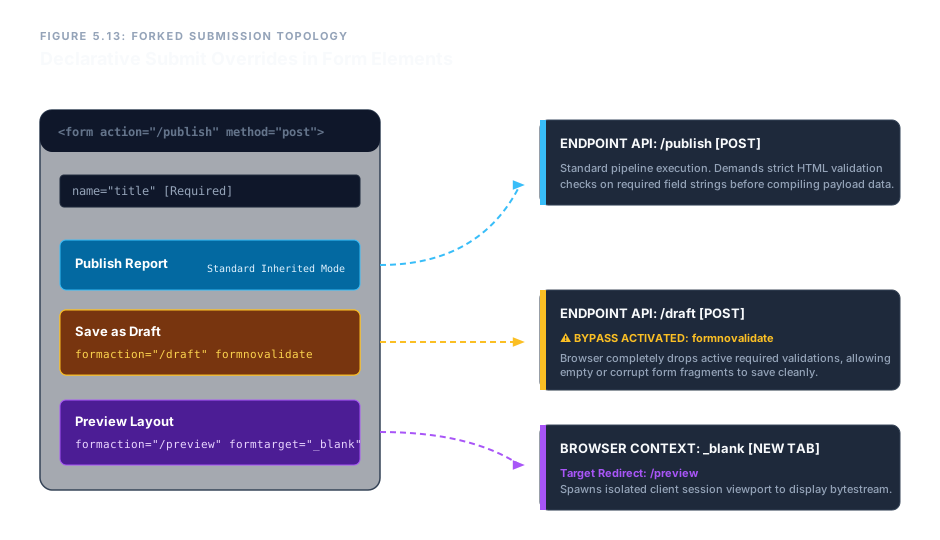
By default, a <button type="submit"> inherits the parent <form>’s action, method, and other attributes. But you can override every one of those parameters directly on the button itself using five special attributes, allowing a single form to dispatch data to different endpoints with different settings.
formaction – Redirect to a Different URL
Overrides the form’s action. Clicking this button sends the data to its own URL.
<button type="submit" formaction="/draft">Save Draft</button>
formmethod – Change HTTP Method
Overrides the form’s method. For example, a GET request for a search, even if the main form uses POST.
<button type="submit" formmethod="get">Search</button>
formenctype – Switch Encoding
Overrides the form’s enctype. Essential for a button that uploads a file while the main form sends plain text.
<button type="submit" formenctype="multipart/form-data">Upload</button>
formtarget – Open Response in a New Window
Overrides the form’s target. Use _blank to open the server response in a new tab.
<button type="submit" formtarget="_blank">Open Preview</button>
formnovalidate – Bypass Validation
A boolean attribute that disables browser validation for this specific button. Ideal for a "Save as Draft" action that should skip required fields.
<button type="submit" formnovalidate>Save as Draft</button>
Decoupled Controls: The form Attribute
Historically, every form control had to be a descendant of the <form> element to be included in its submission. The form attribute shatters that limitation. You can place inputs, selects, textareas – even entire sections – anywhere in the DOM, and simply link them to a form by referencing the form’s id.
Step 1: Give your <form> a unique id.
Step 2: On any external control, add form="that-id".
<form id="main-form" action="/submit" method="post">
  <input type="text" name="inside-field">
  <button type="submit">Send</button>
</form>

<!-- These controls are outside the form, yet belong to it -->
<input type="text" name="external-username" form="main-form">
<textarea name="external-note" form="main-form"></textarea>Controls outside the form, but linked via form="main-form-demo":
When the "Send" button is clicked, both the inside field and the external fields are included in the submission. The DOM location no longer matters – only the form attribute link.
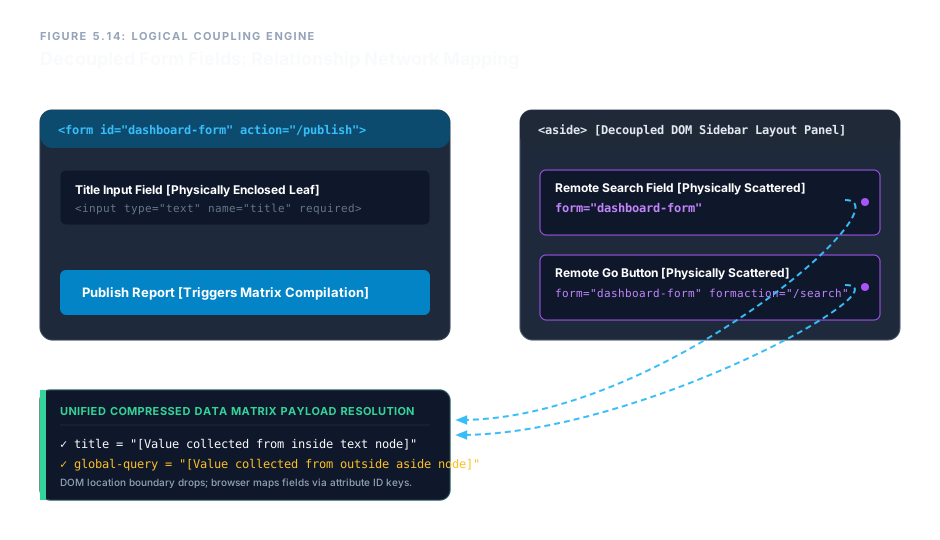
form attribute creates a logical network, freeing controls from physical nesting.This technique lets you keep complex table‑based data grids or sidebar panels untouched while still including their fields in any form. It cleanly separates visual layout from data‑gathering logic, a hallmark of professional‑grade engineering.
Multi‑Action Dashboard with Decoupled Controls – Complete Blueprint
The following example combines submit overrides and the form attribute into a single, realistic scenario. A central form handles report generation, while a draft‑save button bypasses validation, and a remote search input in the sidebar feeds the same form.
<form id="dashboard-form" action="/publish" method="post">
  <fieldset>
    <legend>Report Builder</legend>
    <label>Title: <input type="text" name="title" required></label>
    <label>Content: <textarea name="body" rows="4"></textarea></label>

    <button type="submit">Publish Report</button>
    <button type="submit" formaction="/draft" formnovalidate>Save as Draft</button>
    <button type="submit" formaction="/preview" formtarget="_blank">Preview</button>
  </fieldset>
</form>

<!-- Decoupled search panel -->
<aside>
  <label>Quick Search: <input type="search" name="global-query" form="dashboard-form"></label>
  <button type="submit" form="dashboard-form" formaction="/search" formmethod="get">Go</button>
</aside>
The "Save as Draft" button skips validation and sends data to /draft. "Preview" opens the result in a new tab. The sidebar search input, though visually outside the form, submits its query to /search using the GET method – all thanks to the form attribute and submit overrides. No JavaScript, no duplication, just clean, declarative HTML.
Advanced form techniques give you the flexibility to design complex user interfaces without sacrificing semantic structure. With formaction, formmethod, formenctype, formtarget, and formnovalidate, a single form can serve multiple backend actions. The form attribute liberates controls from physical nesting, letting you place inputs anywhere in the document while still belonging to a logical form. Together, they represent the pinnacle of HTML’s declarative form power.