7.5 — Declarative Shadow DOM: shadowrootmode on <template>
Until now, creating a truly encapsulated component required JavaScript to attach a shadow root. With the shadowrootmode attribute on a <template>, you can declare a shadow root entirely in HTML. The browser automatically wraps your component’s internal styles and content in an isolated rendering boundary – no scripts needed.
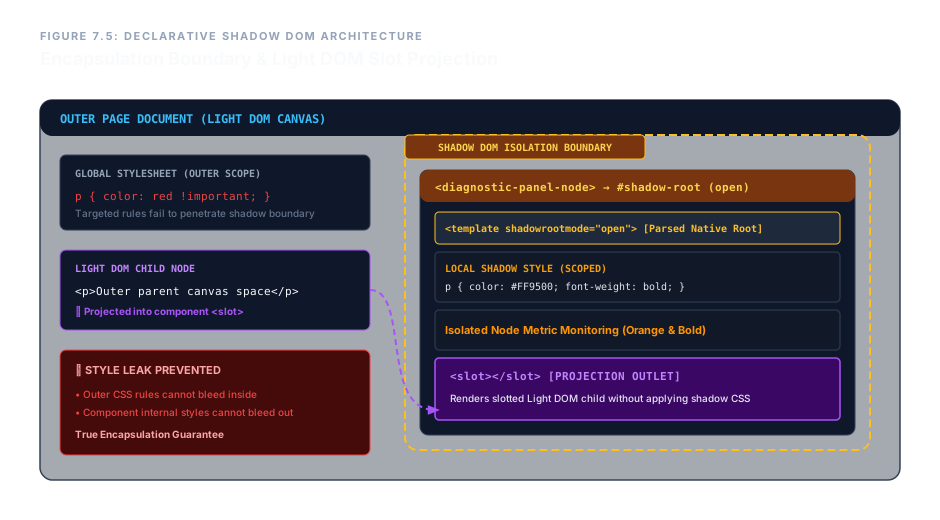
<template> becomes a live shadow root, sealing internal styles and content from the light DOM.How Declarative Shadow DOM Works
When a custom element contains a <template> with the shadowrootmode attribute, the browser skips the usual inert behaviour. Instead, it immediately converts the template into the element’s shadow root. All content inside that template – including <style> blocks – becomes the component’s internal, encapsulated view.
The value of shadowrootmode determines the visibility of the shadow root to external scripts:
open– the shadow root can be accessed viaelement.shadowRoot. Useful for debugging and testing.closed– the shadow root is completely sealed;element.shadowRootreturnsnull. Provides maximum encapsulation for security‑sensitive components.
Regardless of the mode, internal styles never leak out, and outer page styles do not accidentally affect the component. This is the core benefit of shadow DOM: true isolation.
Simple Example: A Counter Component (Pure HTML)
The following markup creates a <my-counter> custom element with an internal style, a heading, a paragraph, and a slot for external content. No JavaScript – the shadow root is attached declaratively.
<!-- The custom element -->
<my-counter>
  <template shadowrootmode="open">
    <style>
      h3 { color: #ff9500; margin-top: 0; }
      p  { font-style: italic; }
    </style>
    <h3>Counter: 0</h3>
    <p>This text is inside the shadow DOM.</p>
    <slot></slot>
  </template>
  <button>+1</button> <!-- light DOM, slotted -->
</my-counter>
The orange heading and italic paragraph are isolated – no other heading on the page will pick up these styles. The <button> placed in the light DOM is projected into the <slot>, appearing inside the component but not styled by the shadow tree.
Live Demo: Isolated Node Monitor
Below is a fully functional declarative shadow DOM component. A tiny script registers the custom element <diagnostic-panel-node> – just enough to make the browser attach the shadow root. The internal style turns text orange and bold, but only inside the component. The outer paragraph remains untouched.
Isolated Node Metric Monitoring
Internal Shadow Layer Status Flags: Active
This paragraph belongs to the outer parent canvas space.
Notice: the paragraph inside the component is orange and bold; the paragraph outside remains default. The styles are completely isolated.
Even if a global stylesheet tried to set p { color: red !important; }, the shadow DOM paragraph would stay orange. The encapsulation works both ways.
Enterprise Blueprint – Full Declarative Component with Open Shadow Root
The following code repeats the entire structure from our spoken walkthrough, showing a complete, production‑grade encapsulated widget. The styles are local, the slot accepts external content, and the shadow root is open for debugging.
<diagnostic-panel-node>
  <template shadowrootmode="open">
    <style>
      p { color: #FF9500; font-weight: bold; }
    </style>
    <h3>Isolated Node Metric Monitoring</h3>
    <p>Internal Shadow Layer Status Flags: Active</p>
    <slot></slot>
  </template>
  <p>This paragraph belongs to the outer parent canvas space.</p>
</diagnostic-panel-node>
The <diagnostic-panel-node> tag becomes a custom component whose internal styling never conflicts with the rest of the page. The slot allows light‑DOM content to be projected exactly where intended.
Declarative Shadow DOM removes the need for JavaScript when creating encapsulated components. Use shadowrootmode="open" for inspectable, debuggable shadow roots; use shadowrootmode="closed" for sealed internal trees. Combined with <template> and <slot>, you now have a complete, pure‑HTML component model that is both powerful and future‑proof.