8.6 — Global Event Attributes & Why They Are Discouraged
Global event attributes like onclick, onload, or onchange let you embed behaviour directly into your HTML tags. While they seem convenient, they violate the separation of concerns, create maintenance nightmares, and introduce severe security vulnerabilities – making them an anti‑pattern for any production‑grade application.
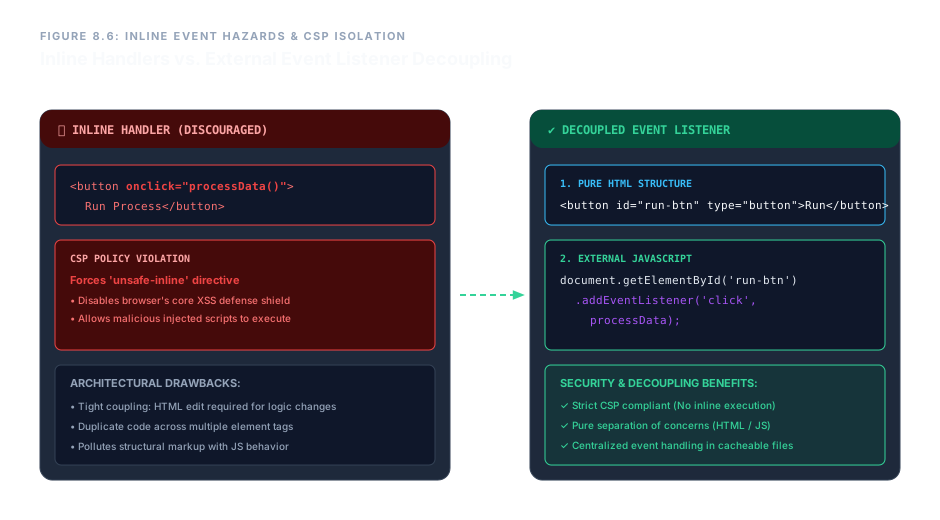
Violating the Separation of Concerns
HTML is for structure. CSS is for presentation. JavaScript is for behaviour. When you write:
<button onclick="doSomething()">Click</button>
…you are mixing behaviour directly into your structural markup. This creates a tightly coupled mess where any change to the logic requires editing raw HTML files – a tedious and error‑prone process across large codebases.
If you have fifty buttons that each call the same function, changing that function means either risking a global edit or, worse, manually updating each attribute. Externalising the behaviour keeps your HTML clean and your logic centralised.
The Security Disaster: Content Security Policy (CSP)
Modern web applications defend against Cross‑Site Scripting (XSS) attacks by deploying a Content Security Policy (CSP). A strong CSP tells the browser: “Do not execute any script that is embedded inside the HTML.”
However, inline event attributes are exactly that – embedded scripts. To make them work, you must add the dangerous 'unsafe-inline' directive to your CSP, which effectively disables the browser’s most powerful XSS protection. A single legacy onclick can force your entire security policy to become a sieve, allowing attackers to inject and execute malicious code through any input field.
Never add 'unsafe-inline' to a production CSP just to support inline event handlers. Instead, remove the inline handlers and use external addEventListener calls.
The Clean, Secure Alternative: External Event Listeners
Instead of embedding behaviour in your HTML, keep your markup pure and attach listeners from a separate JavaScript file. This respects the separation of concerns, keeps your CSP strong, and makes your code immeasurably easier to maintain.
❌ Deprecated Inline Approach
<button onclick="processData()">Run</button>
✔ Modern External Approach
<!-- HTML: pure structure, no behaviour -->
<button id="run-button" type="button">Run</button>

<!-- External JavaScript file -->
<script>
  document.getElementById('run-button')
    .addEventListener('click', processData);
</script>
Now your HTML remains pristine and security‑policy compliant. The logic lives in a separate, cacheable file that can be reused and updated independently.
Enterprise Blueprint – A Behaviour‑Free Interactive Panel
The following blueprint demonstrates a professional, production‑ready component. It uses explicit type declarations, unique ids, and semantic classes – but absolutely no inline event attributes. Behaviour will be attached from an external script (not shown), keeping the HTML layer secure and maintainable.
<div class="control-panel-matrix">
  <section class="action-trigger-zone">
    <button type="button"
            id="telemetry-activation-link"
            class="btn-primary-action">
      Execute System Diagnostic Ingestion Flow
    </button>
  </section>
</div>This button has no inline handlers. All behaviour would be attached externally via JavaScript, keeping the HTML clean and CSP‑friendly.
By initialising your tag pairs bare, assigning only semantic identifiers, and leaving all behavioural logic to external scripts, you build interfaces that are secure, scalable, and ready for the most demanding production environments.
Global event attributes are a relic. They merge structure with behaviour, cripple maintainability, and force dangerous CSP downgrades. Modern web engineering demands a clean separation: HTML for structure, CSS for presentation, and external JavaScript with addEventListener for behaviour. By purging all inline event handlers, you protect your users, simplify your codebase, and build a truly future‑proof architecture.