9.1 — Textual Metadata & Crawler Instructions
The <head> of your document is its command centre for machines. Search engines, social networks, and automated crawlers read the metadata here to understand your page without ever painting a pixel. The <meta> element is the primary carrier of this intelligence – a void element that delivers directives in a single, self‑closing tag.
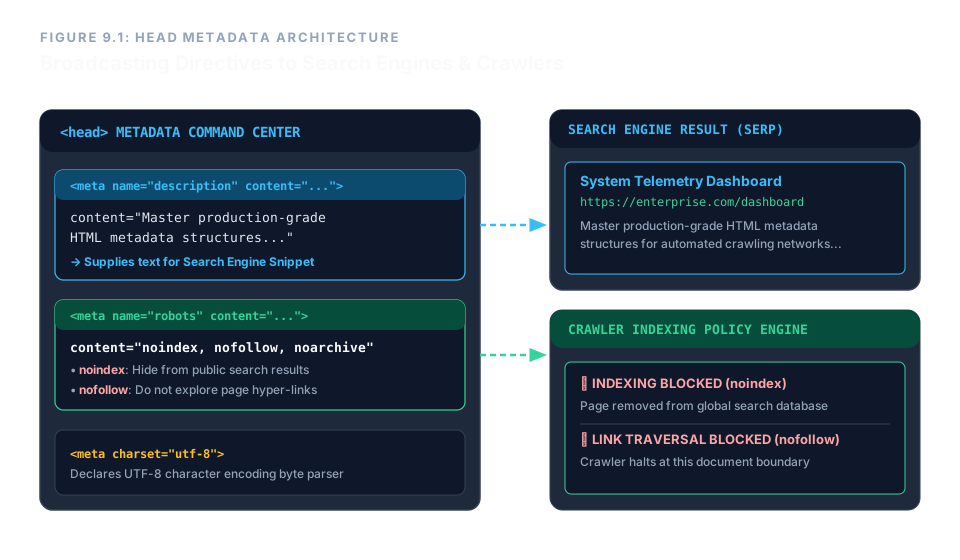
<head> broadcast instructions to crawlers and indexers.The <meta> Element – A True Void
As established in our earlier study of special syntax, <meta> is a void element. It cannot contain child content, and you must never write a closing tag for it. The browser closes the element the moment the opening bracket is complete.
<meta name="description" content="…">
Adding a trailing slash (/>) is allowed for compatibility but is ignored by the parser. The important rule: never write </meta>.
The Description Meta – Your Search Snippet
The <meta name="description"> tag provides the text that search engines typically display beneath your page title in results. Without it, the crawler pulls random text from your body – often navigation links or broken fragments.
<meta name="description" content="A concise, human‑readable summary of the page.">
Best practices:
- Keep it between 150‑160 characters to avoid truncation.
- Write a unique description for each page – never duplicate across a site.
- Use natural language that entices clicks, but accurately reflects the content.
When a crawler encounters this tag, it caches the description and uses it to build the rich snippet in search results, directly influencing click‑through rates.
The Robots Meta – Indexing and Crawling Control
The <meta name="robots"> tag tells search engines exactly what they are allowed to do with your page. It is a critical security and privacy tool.
The content attribute accepts a comma‑separated list of directives. The three most important are:
noindex– prevent the page from appearing in search indexes entirely.nofollow– instruct the crawler not to follow any links on the page, nor pass ranking credit.noarchive– forbid the search engine from storing a cached copy of the page.
<meta name="robots" content="noindex, nofollow, noarchive">
This combination completely locks the page out of public view. It is ideal for internal admin panels, staging servers, or any page that should never appear in a Google search. Omitting the tag entirely defaults to index, follow – the page will be indexed and links will be explored.
The robots meta is an instruction, not an enforcement. Malicious bots may ignore it. For stronger protection, pair it with server‑side controls like robots.txt and authentication.
Enterprise Blueprint – A Fully Configured Head
A production‑grade page often combines both meta tags, along with the charset declaration, to form a robust metadata shield. The following snippet shows a realistic <head> ready for search and privacy.
<head>
  <meta charset="utf-8">
  <title>System Telemetry Dashboard</title>
  <meta name="description"
        content="Master production‑grade HTML core metadata architectures. Optimize application indexing tracking structures for modern automated crawling networks.">
  <meta name="robots"
        content="noindex, nofollow, noarchive">
</head>
With these three elements, you declare the character encoding, provide a rich search snippet, and lock the page against crawling – all within a few lines of pure HTML. No scripts, no server configuration required.
The <head> is the silent commander of your document. Use <meta name="description"> to craft compelling search snippets. Use <meta name="robots"> to control indexing and link traversal. Both are void elements – no closing tag ever. Master these, and you control how the world discovers (or does not discover) every page you build.