9.3 — Social Graph Configurations
When you share a link on a social network or messaging app, the platform scans your page’s <head> for metadata that defines the preview – title, description, image. Without this data, you get an ugly, auto‑generated snippet. With Open Graph and Twitter Cards, you take full control over how your work appears to the world.
The Void‑Element Workflow – Adapting for Meta Tags
Every <meta> tag is a void element. It cannot hold child content or a closing tag. Our engineering discipline adapts perfectly: we write the single tag, then populate its attributes. The moment the closing bracket is read, the node is sealed in memory.
<meta property="og:title" content="...">
There is never a </meta>. Adding one is a syntax error that triggers parser recovery. Keep your void tags clean.
The Open Graph Protocol – Controlling Your Link Preview
Open Graph (OG) meta tags use the property attribute instead of name. They are the standard for Facebook, LinkedIn, Slack, Discord, and most other platforms. At minimum, you need a title, a description, and an image.
Title – og:title
The headline of your preview card. It should be concise and match the page’s primary purpose.
<meta property="og:title" content="Production Infrastructure Framework">
Description – og:description
A short summary that appears below the title. Use natural language, 1‑2 sentences, and include a call to action if appropriate.
<meta property="og:description" content="A comprehensive guide to deploying scalable, secure telemetry dashboards.">
Image – og:image
The absolute URL of the image that will accompany your link. Use a high‑quality, relevant graphic (recommended size: 1200 × 630 pixels). The image must be publicly accessible.
<meta property="og:image" content="https://core.systems/assets/shared-thumbnail.jpg">
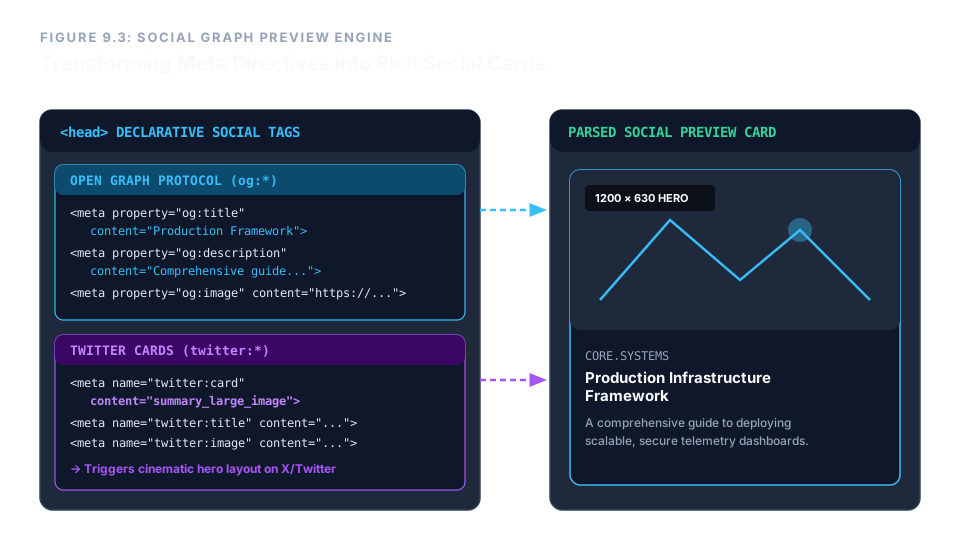
When a crawler encounters these three tags, it assembles a visually compelling card that dramatically increases click‑through rates compared to a bare URL.
Additional Useful OG Tags
og:type– the type of content (e.g.,website,article,video.movie). Default iswebsite.og:url– the canonical URL of the page (prevents duplicate content issues if the same page is reachable from multiple addresses).og:site_name– the human‑readable name of your overall site.
Twitter Cards – Optimising for X (Twitter)
Twitter uses its own set of meta tags, though it falls back to Open Graph if they are absent. For full control, define both. The most important Twitter‑specific tag is twitter:card, which sets the preview layout.
The value summary_large_image tells Twitter to render a full‑width hero image above the title, rather than a tiny thumbnail. This is the preferred card for articles, dashboards, and any visual content.
<meta name="twitter:card" content="summary_large_image">
<meta name="twitter:title" content="Production Infrastructure Framework">
<meta name="twitter:description" content="A comprehensive guide to deploying scalable, secure telemetry dashboards.">
<meta name="twitter:image" content="https://core.systems/assets/shared-thumbnail.jpg">
Notice that Twitter Card tags use the name attribute (like standard meta), not property. The title, description, and image can duplicate the OG values – it’s perfectly safe and ensures consistent rendering across all platforms.
Enterprise Blueprint – A Complete Social‑Ready Head
The following <head> combines Open Graph and Twitter Card meta tags with standard metadata. Every tag is a void element, properly sealed. This is the gold standard for any production page that will be shared on social media.
<head>
  <meta charset="utf-8">
  <title>Production Infrastructure Framework</title>

  <!-- Open Graph -->
  <meta property="og:title" content="Production Infrastructure Framework">
  <meta property="og:description" content="A comprehensive guide to deploying scalable, secure telemetry dashboards.">
  <meta property="og:image" content="https://core.systems/assets/shared-thumbnail.jpg">
  <meta property="og:type" content="website">
  <meta property="og:url" content="https://core.systems/dashboard">

  <!-- Twitter Card -->
  <meta name="twitter:card" content="summary_large_image">
  <meta name="twitter:title" content="Production Infrastructure Framework">
  <meta name="twitter:description" content="A comprehensive guide to deploying scalable, secure telemetry dashboards.">
  <meta name="twitter:image" content="https://core.systems/assets/shared-thumbnail.jpg">
</head>
With this configuration, every share on LinkedIn, Twitter, Facebook, Slack, or Discord will display a polished, attractive preview – controlled entirely by declarative HTML in the document head.
Social graph meta tags are your page’s public face. Use og:title, og:description, and og:image for universal preview control. Add twitter:card with summary_large_image for a cinematic X (Twitter) experience. Always supply absolute URLs for images. These tags are void elements – never close them. With a few lines in your <head>, you ensure your content looks professional wherever it travels.