9.5 — Script Placement Mechanics & Render Impact
A standard <script> tag blocks HTML parsing until the file is downloaded and executed. Placed in the <head>, it can freeze your page blank. Two modern attributes—defer and blocking="render"—give you precise control over when scripts load and when the browser paints, ensuring a seamless experience without a single line of JavaScript.
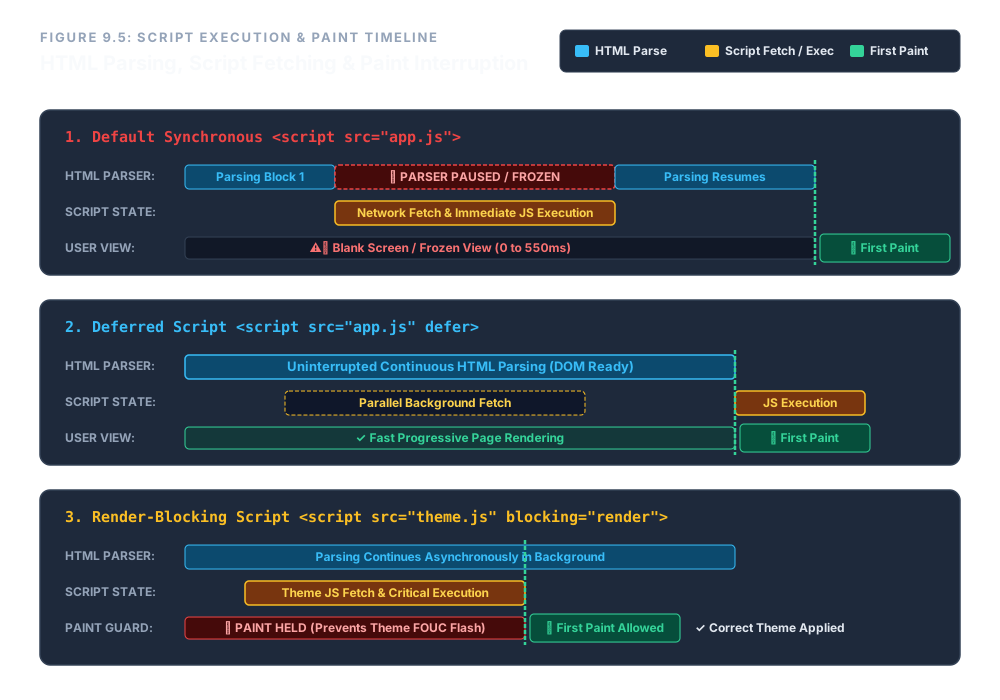
defer and blocking="render" alter the script execution and paint timeline.The Default Blocking Nature of <script>
By default, the browser halts all DOM construction the moment it encounters a <script> tag. It must download, parse, and execute the script before continuing. If that script sits in the <head>, the user sees a completely blank page until the script finishes.
<script src="heavy.js"></script>
This is the old‑school behaviour that gave JavaScript a bad name for performance. Modern HTML provides escape hatches that let the browser continue parsing while the script downloads, giving you control over exactly when execution happens.
defer – Download in Background, Execute After DOM
The defer attribute is a boolean. When present, the browser downloads the script asynchronously while continuing to parse the HTML. The script is guaranteed to execute only after the entire document has been parsed and the DOM is ready—right before the DOMContentLoaded event.
Multiple deferred scripts execute in the exact order they appear in the document. This makes defer the ideal choice for most application scripts: they don't block rendering, yet they always have access to the complete DOM tree.
<script src="app-runtime.js" defer></script>
<script src="analytics.js"    defer></script>
Notice the tag‑pair discipline: we always write the opening and closing tags together first, then populate the attributes. This ensures well‑formed markup.
blocking="render" – Pause Painting Until Script Runs
There is a rare but critical use case where you need a script to run before the first pixel is painted, but you don't want it to block HTML parsing. For example, a theme script that sets a CSS class on the <html> element to prevent a flash of unstyled content (FOUC).
The blocking="render" attribute does exactly this: the browser continues to parse the HTML in the background, but it will not paint anything to the screen until this specific script has finished executing. The script itself can be downloaded asynchronously (like defer), but painting is held until the script's execution completes.
<script src="theme-engine.js" blocking="render"></script>
This is different from a plain blocking script, which stops both parsing and painting. With blocking="render", parsing continues; only the visual output is delayed. It's a scalpel, not a sledgehammer.
Quick Comparison
| Attribute | Download | HTML Parsing | Execution | Painting |
|---|---|---|---|---|
| (none) | Blocks | Blocked | Immediate | Delayed |
defer | Parallel | Continues | After DOM ready | Normal |
blocking="render" | Parallel* | Continues | As soon as ready | Held until script runs |
* When combined with async or defer; without them, blocking="render" also blocks parsing.
Enterprise Blueprint – A Fully Controlled Script Pipeline
The following snippet shows a production‑grade head that loads a theme script with blocking="render" to prevent FOUC, and defers the main application bundle. Parsing never stops, and the page paints only when the theme is ready.
<head>
  <meta charset="utf-8">
  <title>Core Dashboard</title>

  <!-- Theme script: must run before first paint -->
  <script src="theme-engine.js" blocking="render"></script>

  <!-- Application: defer, download in background, execute after DOM -->
  <script src="app-runtime.js" defer></script>
</head>
With this arrangement, the browser downloads both scripts while parsing the HTML. The theme runs first, allowing the correct styles to be applied, and only then does the page paint. The main app initialises after the DOM is complete, ensuring all elements are accessible. The result is a fast, flicker‑free experience.
Never leave a <script> naked in the <head>. Use defer for application logic—it downloads in parallel and executes after the DOM is ready. Use blocking="render" sparingly for critical scripts that must run before paint, like theme loaders. Both attributes keep the HTML parser moving, keeping your page responsive and your users happy.