0.3 — The Philosophy: Separation of Concerns
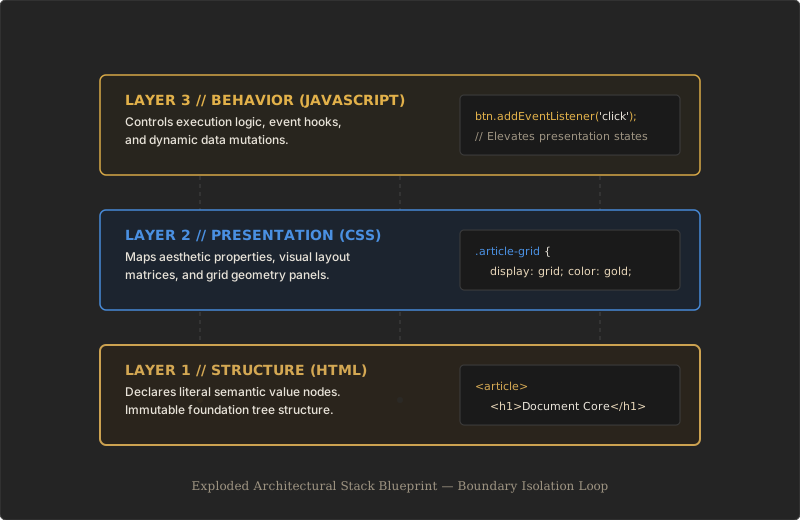
Now that we know what a markup language is, we need to understand the single golden rule that governs everything in modern web design. It is a philosophy called the Separation of Concerns. This rule insists that a web page must be split into three completely isolated layers, and each layer must mind its own business. No crossing the lines.
Structure · Presentation · Behavior – three independent systems that, when kept apart, create a web that is maintainable, accessible, and fast.
Layer One: Structure (HTML)
Think of HTML as the concrete foundation, the steel pillars, and the raw framing of a building. HTML does not care about colours, fonts, or animations. Its sole job is to declare what the content is. It marks document boundaries, builds a logical hierarchy, and labels every piece of text so the computer understands: “this is a major heading”, “this is a navigation block”, “this is a data table”. Without structure, a page is just a pile of words with no map.
Returning to our manuscript editor from Section 0.1, HTML is exactly the red‑pen annotations on the parchment. The pilcrow that says “new paragraph here”, the asterisk that points to a footnote, the section sign that marks a chapter boundary – these are all structural markers, not visual decorations. HTML continues that tradition in a form machines can process.
Layer Two: Presentation (CSS)
If HTML is the framing, CSS – Cascading Style Sheets – is the interior paint, the decorative trim, and the glass windows. CSS takes the bare structural skeleton that HTML provides and decides how it should look. It sets colours, margins, typefaces, column layouts, and even subtle animations. The critical rule is that CSS never adds new content or changes the document’s meaning; it only adjusts the visual experience.
A single CSS stylesheet can control the appearance of a thousand pages. Change one colour value in that sheet, and every heading across the entire website updates instantly – without touching a single line of HTML.
Layer Three: Behavior (JavaScript)
The third layer is behaviour, and it belongs to JavaScript. If the building is finished, JavaScript is the automated elevator, the plumbing valves, and the light switches. It adds logic, handles data, and makes the page react dynamically – opening a menu when you click a button, validating a form before it is sent, or fetching fresh information without reloading the page.
Behaviour is the most powerful layer, but also the most dangerous if it leaks into structure or presentation. When JavaScript is kept in its own separate scripts, the page remains understandable and repairable even if the behaviour is turned off entirely.
Why This Separation Matters
Maintainability
When the layers stay in their own boxes, fixing or updating a site becomes dramatically simpler. Need a fresh look? Edit one CSS file. Need to change how a form processes data? Update one JavaScript file. The HTML, which holds the actual content, remains untouched. This isolation means changes can be made with confidence, knowing that fixing the paint won’t accidentally crack the foundation.
Accessibility
For a visually impaired person using a screen reader, the visual layer (CSS) is completely ignored. The assistive software reads the raw HTML structure directly. If you have blurred the lines – if you hid important content inside a style property, or used a visual trick to convey meaning – that information is lost. Clean, semantic HTML ensures that everyone, regardless of how they access the page, receives the same structural truth.
Performance
Browsers are engineered to parse HTML, CSS, and JavaScript in separate, optimized pipelines. When the three are kept apart, the browser can download the HTML and start rendering text almost instantly, while the styles and scripts load in the background. A tangled mess of inline styles and embedded scripts blocks this pipeline and makes the page feel sluggish.
In the early days of the web, many developers mixed the layers without a second thought. They would write <font color="red"> directly in the HTML to change text colour, or <center> to position something in the middle of the page. They would also sprinkle little pieces of JavaScript inside an element’s onclick attribute. This approach creates what engineers call spaghetti code – tangled, brittle, and extremely difficult to change. Modern web standards have completely abandoned these practices, and you will learn to avoid them from day one.
The Editor’s Desk, Revisited
Imagine our manuscript editor from the earlier sections. If they started drawing pictures of finished pages directly onto the parchment – painting colours, sketching ornamental borders, and scribbling “this text should turn blue when clicked” – the original meaning would be buried. The typesetter would be confused, the printer would be lost, and any later corrections would be a nightmare. The editor’s discipline of using only abstract symbols (pilcrow, asterisk, caret) is precisely the discipline the Separation of Concerns demands of a web developer.
As we move through this course, remember this strict boundary. We are here to master the foundation. No styles, no programming logic. Just pure, rock‑solid structural HTML – the digital equivalent of those crisp, clear editorial marks on a manuscript.