1.6 — The Document Object Model: A Tree of Nodes
In the previous sections we saw how a browser can auto‑correct missing structural wrappers. But what exactly happens inside the browser after it reads your HTML? The answer is the Document Object Model – a living, hierarchical map of your page that the browser constructs in memory. Understanding this tree is the key to thinking like a web engineer.
From Source Code to a Tree
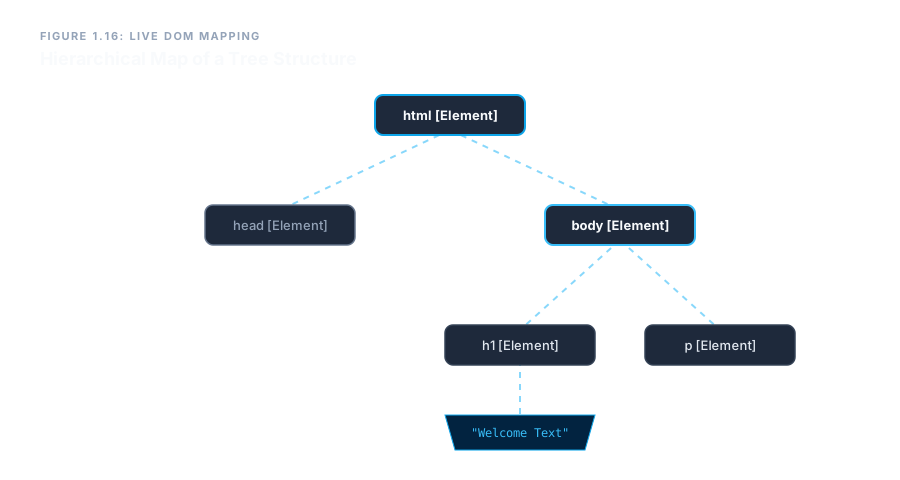
When you write an HTML file, you create a flat string of characters – the source code. The browser’s parser reads that string, identifies tags, attributes, and text, and then builds a tree structure called the Document Object Model, or DOM for short.
A tree, in computer science, is a way of organising objects where each object (called a node) can have one parent and many children. The DOM uses exactly this organisation. The entire document becomes the root of the tree, and every element, piece of text, and comment becomes a branch or a leaf.
Node Types
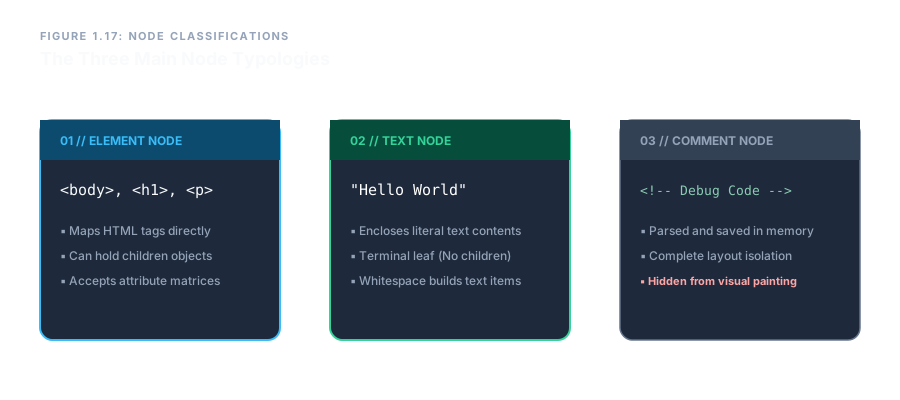
The DOM contains several kinds of nodes, but the three most important are:
- Element nodes – represent the HTML tags themselves (e.g.,
<body>,<h1>). They can have children and attributes. - Text nodes – contain the actual text inside an element. Even a single word between tags becomes a text node. For example, the “Welcome” inside
<h1>Welcome</h1>is a text node. - Comment nodes – represent the
<!-- … -->comments we discussed earlier. They are stored but not displayed.
The browser uses these nodes to render the page. It walks the tree, calculates dimensions, and paints text and boxes onto the screen.
The Browser’s Implicit Correction, Explained by the DOM
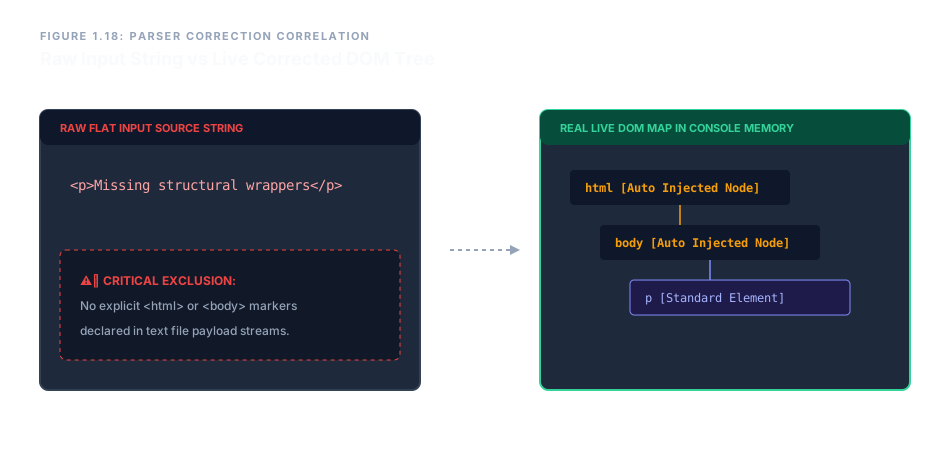
Now we can finally understand why the browser’s safety net works. When you omit the <html> or <body> tags, the parser does not panic. It simply creates those missing element nodes in the DOM automatically, inserts your content as children, and continues building the tree. The source code remains unchanged, but the live DOM is always complete.
This is why you can never fully trust the “View Source” output to reflect what the browser is actually working with. The Elements panel in your developer tools shows the real DOM – a fully corrected, live tree.
Parents, Children, and Siblings
The tree metaphor gives us precise vocabulary for describing relationships:
- A parent node directly encloses another node. In
<body><p>Hello</p></body>, the<body>is the parent of the<p>element node. - A child node is directly enclosed by a parent. The
<p>element is a child of<body>. - Siblings are nodes that share the same parent. Two
<p>elements inside the same<body>are siblings. - The root is the topmost node – the document itself.
Understanding these relationships is essential for later when we learn to style specific elements or apply scripting, but even now, the DOM explains why your headings and paragraphs appear in the order you wrote them: the browser is walking the tree from top to bottom, rendering each node in turn.
The DOM is not the source code; it is the live, corrected tree that the browser builds from your HTML. Every tag becomes an element node, every piece of text a text node, and every comment a comment node. Master this mental model now, and you will have a solid foundation for everything that follows – from CSS styling to interactive scripting.