1.5 — Special Syntax: Comments, Void Elements, and Raw Text
Beyond the standard tags and attributes, HTML provides several special syntactic forms that control how the parser interprets the document. Mastering these – comments, void elements, and raw text containers – is essential for writing clean, error‑free markup and understanding how the browser truly processes your code.
HTML Comments
A comment is a block of text completely ignored by the browser’s rendering engine. It exists solely for human readers (or as a temporary development tool) and does not appear on the screen. The syntax is:
<!-- this is a comment -->
Comments can span multiple lines and may contain any characters except the sequence --, because two consecutive hyphens inside a comment would prematurely close it.
- Debugging: Temporarily “comment out” a block of HTML to test a page without that content.
- Structuring: Use comments to label major sections, such as
<!-- Header -->or<!-- Footer -->, making the source more readable. - Internal storage: Although invisible, comments are stored as Comment nodes in the browser’s internal document representation. They have no visual output, but they can be inspected via the browser’s developer tools (the Elements panel).
Never rely on comments to hide sensitive information. They are visible to anyone who views the page source. Use them for documentation and temporary code removal only.

Void Elements
Void elements are a special class of HTML elements that cannot have any content and do not require a closing tag. They represent a single, self‑contained instruction – such as inserting an image, a line break, or a metadata declaration.
The complete list of void elements in HTML is:
<area> <base> <br> <col> <embed> <hr> <img> <input> <link> <meta> <param> <source> <track> <wbr>
Because they have no inner content, you should never write a closing tag for a void element. For example, <br></br> is invalid and may confuse the parser.
The Trailing Slash Illusion
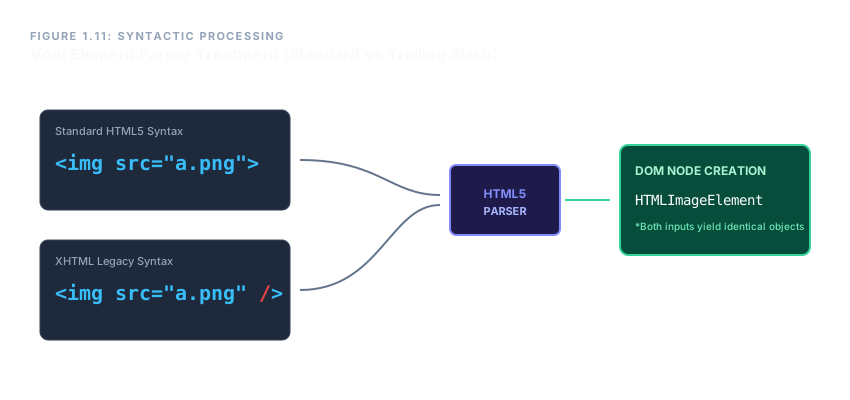
You may occasionally see void elements written with a trailing slash, like <br />. This syntax originates from XHTML, where every element required explicit closure. In HTML5, the slash is allowed but ignored. The browser treats <br /> exactly as <br>. There is no self‑closing mechanism in HTML; the slash is simply discarded by the parser.
Raw Text Elements
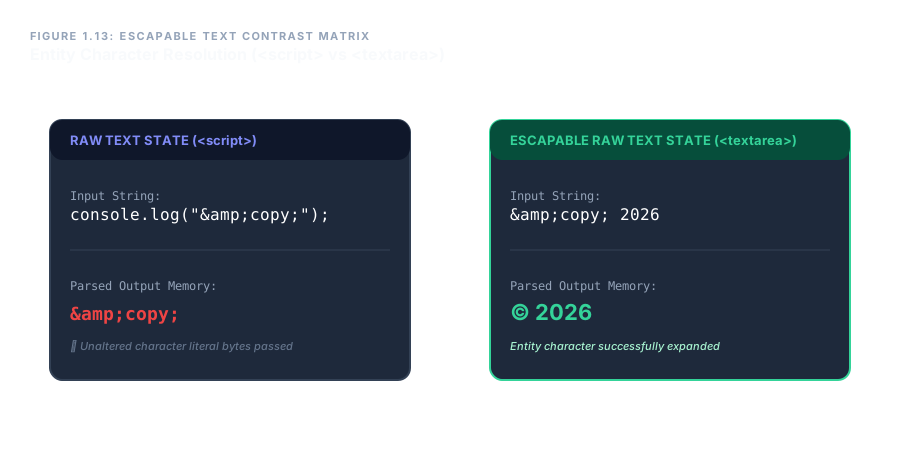
HTML defines a special category of elements whose content is not parsed as HTML until the closing tag is encountered. Inside these elements, the tokenizer switches to a raw text state: character references (like &) are not expanded, and the only thing that terminates the element is its exact closing tag.
The two primary raw text elements are <script> and <style>.
<script>– Contains executable code (usually JavaScript). The browser stops parsing HTML inside the tag and passes the raw bytes to the script engine. This is why you can freely write angle brackets and ampersands without escaping them.<style>– Contains CSS rules. The parser treats the entire content as raw text, allowing CSS syntax to coexist without conflicting with HTML markup.
<script>
  if (a < b && c > d) { … }
</script>
In the example above, the < and & inside the script are not interpreted as HTML. They are handed directly to the JavaScript runtime.

<script> and <style>.Escapable Raw Text Elements
A variation of raw text elements exists, called escapable raw text elements. These behave exactly like raw text elements, with one crucial difference: character references are expanded. The parser recognises named entities and numeric references and converts them into the corresponding characters.
The two escapable raw text elements are <textarea> and <title>.
<textarea>– Represents a multi‑line text input. Because it allows users to see literal angle brackets, the content must be escapable. If you write<in a textarea, it will appear as<on screen, while a raw<would also be displayed as<. The escapability gives control over encoding.<title>– Defines the page title shown in the browser tab. The title text is not rendered as HTML, but character references like—are converted, allowing special characters in the tab bar.
<textarea>
<Hello> ← displayed as <Hello> in the text box
</textarea>
<title>
© 2026 My Site ← tab title will show © 2026 My Site
</title>
This subtle difference exists because <textarea> and <title> often contain user‑visible text where special characters are common, while scripts and styles are machine‑readable and benefit from raw, unmodified character sequences.
The Parser’s Context‑Sensitive Modes
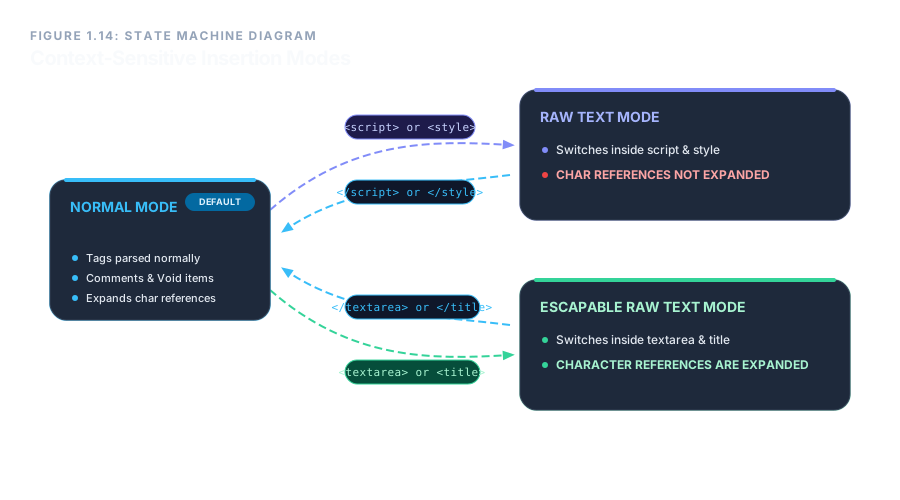
The HTML parser constantly switches between different insertion modes depending on the element it is currently processing. These modes determine how tokens are created and how content is interpreted. The three special modes relevant here are:
- Raw text mode – Entered when a
<script>or<style>opening tag is encountered. The tokenizer scans for the exact closing tag and treats everything in between as literal characters, with no character references expanded. - Escapable raw text mode – Entered for
<textarea>and<title>. Same as raw text, but character references are expanded. - Normal mode – The default mode, where tags are recognised, void elements are handled, and comments are created. This mode also applies inside most other elements.
Understanding these modes is essential for avoiding subtle bugs. For example, attempting to nest a <script> element inside another <script> will always break because the parser would misinterpret the first closing tag it sees.
Comments provide invisible documentation; void elements are self‑contained instructions; raw text elements shield their content from HTML parsing; and escapable raw text elements add character‑reference expansion on top. Together, these special syntaxes give HTML the flexibility to embed scripts, styles, and user input while maintaining a clean, parsable structure.