1.4 — The Skeletal Structure of HTML
While browsers can often guess their way through isolated chunks of text, any production‑grade, standard‑compliant webpage requires a strict structural baseline. This foundational framework is the global layout skeleton – and it must wrap around all of your content.
The Universal Boilerplate
Every valid HTML document uses a standardized layout to establish its operational zones. To understand it, we’ll build it piece by piece, from the outside in.
A critical engineering discipline is to write your opening and closing tags together first – then place your content inside. This eliminates the risk of forgetting a closing tag and breaking the entire document structure.
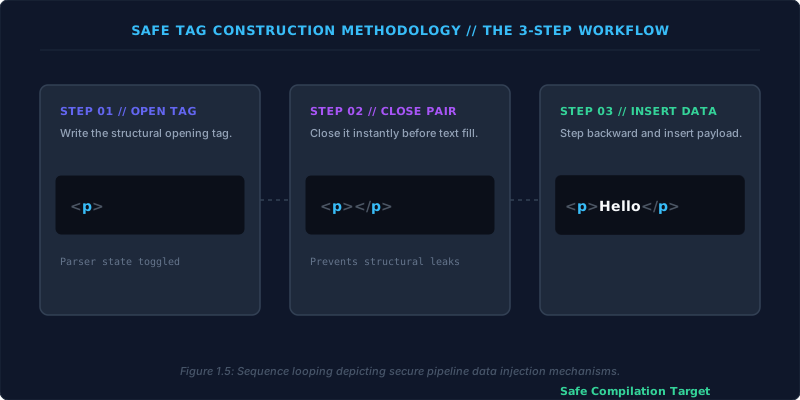
Step‑by‑Step Construction
Let us now assemble the complete document skeleton, starting with the outer boundaries.
- The root container – Write
<html>and</html>together. Add thelangattribute (e.g.,lang="en") to declare the human language of the document. Every element you create from now on must live between these two tags. - Document type declaration – On the very first line, before the root tag, place
<!DOCTYPE html>. This special instruction (it is not an HTML tag) tells the browser which parsing rulebook to use. We’ll return to its importance shortly. - The metadata zone – Inside the
<html>container, write<head>and</head>together. Populate this block with:<meta charset="utf-8">– declares the character encoding so text renders correctly.<title>Page Title</title>– sets the text that appears on the browser tab.
- The visible stage – Directly after the closing
</head>, write<body>and</body>together. This is where every piece of visible content – headings, paragraphs, images, forms – must be placed.
Putting it all together, the complete minimal boilerplate looks like this:
<!DOCTYPE html>
<html lang="en">
<head>
    <meta charset="utf-8">
    <title>My Web Page</title>
</head>
<body>
    <h1>Welcome</h1>
    <p>This is a paragraph.</p>
</body>
</html>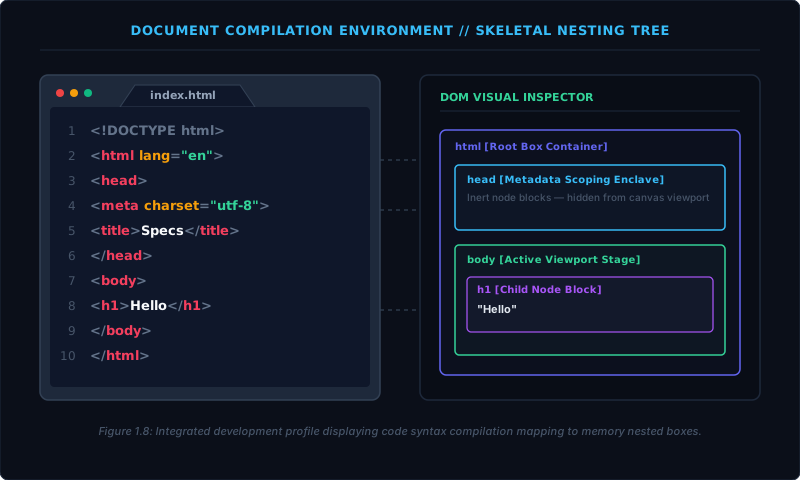
The Doctype – A Mechanical Switch
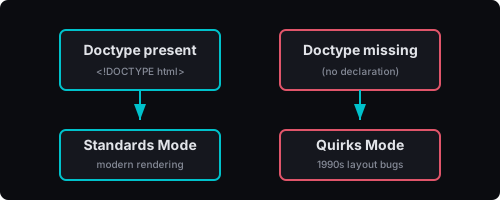
The Document Type Declaration (<!DOCTYPE html>) is the very first line of a valid HTML page. It is not an element; it’s a processing instruction directed at the browser’s parser.
Writing this exact instruction forces the browser to use Standards Mode. In Standards Mode, the layout engine follows the modern web specifications precisely – CSS boxes, margins, and rendering behave as documented.
If you omit the doctype, the browser falls back to Quirks Mode. This mode intentionally mimics the rendering bugs of late‑1990s browsers, altering line‑heights, table‑width calculations, and box‑model behaviour. It exists solely to prevent ancient, unmaintained websites from breaking. A missing doctype can turn your carefully crafted layout into a scrambled mess.
Operational Zones: Head vs. Body
The browser processes each zone of the skeleton differently:
- Head – A non‑visual metadata container. It holds character encoding, page title, links to stylesheets, scripts, and other configuration data. Nothing inside
<head>is ever drawn on the visible canvas. It is read by the browser in memory to set up environment states. - Body – The universal container for visual content. Every heading, paragraph, table, interactive form, or embedded media asset that a user sees must reside inside
<body>. The layout engine uses this block to calculate dimensions and paint pixels onto the screen.
Separating metadata from visible content keeps the document architecture clean and allows assistive technologies and search engines to extract meaningful information without sifting through display‑oriented markup.
The HTML skeleton – doctype, <html>, <head>, and <body> – is non‑negotiable for any professional webpage. It triggers the correct rendering mode, declares the document language, separates metadata from content, and provides a fault‑tolerant container that browsers, search engines, and assistive devices all rely upon. Master this structure; it is the foundation of everything that follows.