10.3 — The Live Tree Architecture
The DOM is not a file. It is a live, interconnected graph of C++ objects residing in the browser’s memory. Understanding its internal node types, whitespace rules, and dynamic nature is essential for debugging layout and writing performant code.
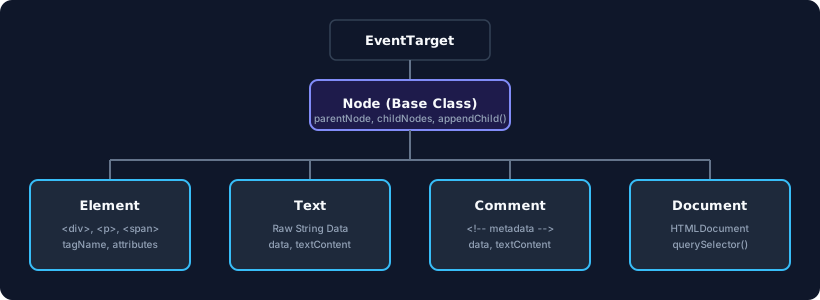
Element Nodes – The Heavy Containers
An Element node represents an HTML tag: <div>, <section>, <input>. It stores tag names, attributes, namespace info, and pointers to its parent, children, and siblings. However, it does not store raw text. The actual character content is delegated to separate Text nodes.
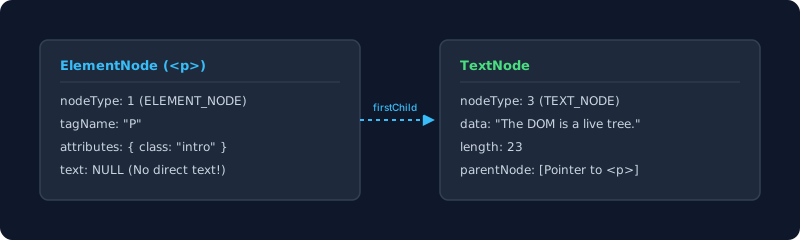
Text Nodes – The Lean Character Containers
A Text node is a slim object that holds a raw string and links to a parent element. It exists solely to store the characters that appear between tags. The browser creates one Text node for every contiguous run of character data.
Comment Nodes – Invisible but Real
HTML comments (<!-- … -->) are not rendered visually, yet the parser instantiates a Comment node object, allocates memory for its string, and grafts it into the DOM tree. It remains fully accessible via scripting.
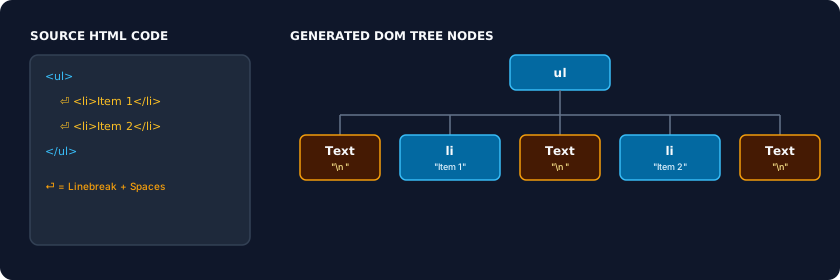
Whitespace Text Nodes – The Hidden Gaps
Spaces, tabs, and line feeds between HTML elements are not ignored. The tokenizer treats them as character data and the tree constructor turns them into real Text nodes. In inline or inline‑block layouts, these invisible nodes create visible gaps on screen, often the 4‑px space between elements. Removing all whitespace between tags can eliminate these gaps.
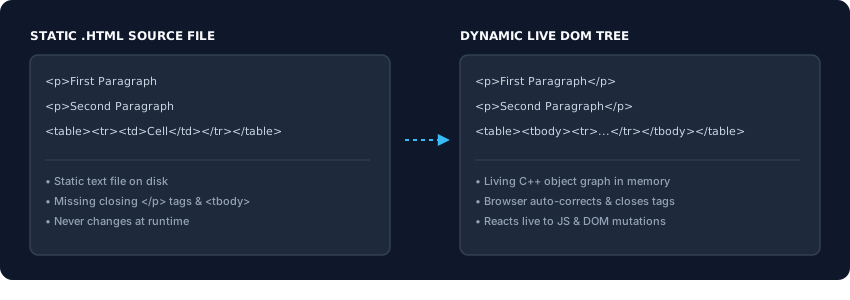
Source Code vs. Live DOM – The Great Divergence
Your raw .html file is a static string that never changes. The live DOM is a reactive graph that begins to diverge the moment the page loads. Browser extensions inject nodes, JavaScript frameworks dynamically create or destroy elements, and the parser’s error recovery silently repairs broken markup – all visible only in the Elements panel.
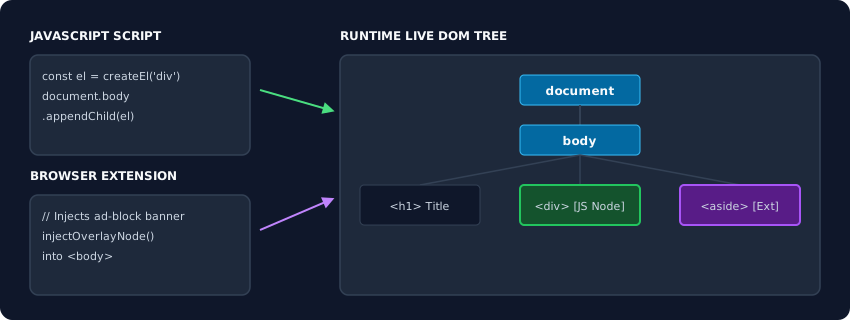
The DOM is a living C++ object hierarchy, not a text file. Element nodes provide structure, Text nodes hold characters, and Comment nodes preserve metadata – all inheriting from a common Node class. Whitespace becomes real nodes, and the live tree diverges from source code the instant it’s built. Use the Elements panel to see the actual runtime graph; never trust View Source alone. This is the reality your CSS and JavaScript interact with.