10.7 — HTML Content Categories & Nesting Restrictions
The old block‑vs‑inline model is gone. Modern HTML defines eight overlapping content categories that govern which elements can live inside which. During tree construction, the browser enforces these rules strictly – silently splitting illegal nesting apart to keep the DOM valid. Mastering these categories is essential for writing robust, predictable markup.
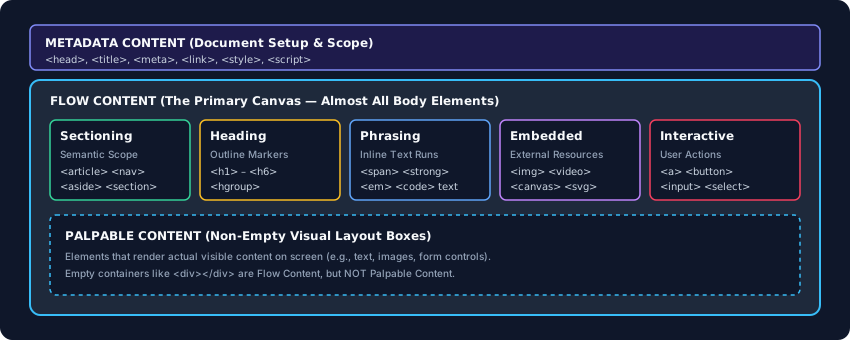
The Core Content Categories
Metadata Content
Elements that configure the document without being visually rendered. Includes <meta>, <link>, <script>, <style>, <title>. These live in the <head>.
Flow Content
The largest category – almost every visible element: <div>, <p>, <h1>‑<h6>, <section>, <article>, <span>, text, <img>, <a>, etc.
Sectioning Content
Defines semantic scope and contributes to the document outline. Strictly <article>, <aside>, <nav>, <section>. Every sectioning element should contain a heading.
Heading Content
<h1> through <h6>, plus <hgroup>. Must reside inside flow or sectioning content to form a valid outline.
Phrasing Content
The “inline” group: <span>, <strong>, <em>, <code>, <img>, <a>, plain text. Phrasing content cannot contain block‑level flow elements like <section>.
Embedded Content
Imported external resources or isolated contexts: <img>, <iframe>, <video>, <audio>, <canvas>, inline <svg>, <math>.
Interactive Content
Elements designed for user interaction: <a>, <button>, <input>, <select>, <textarea>, <details>. Interactive elements may not be nested inside one another.
Palpable Content
Any element that produces a visible layout box with actual content. A <div> with no text or children is not palpable and may be ignored by accessibility tools or optimisers.
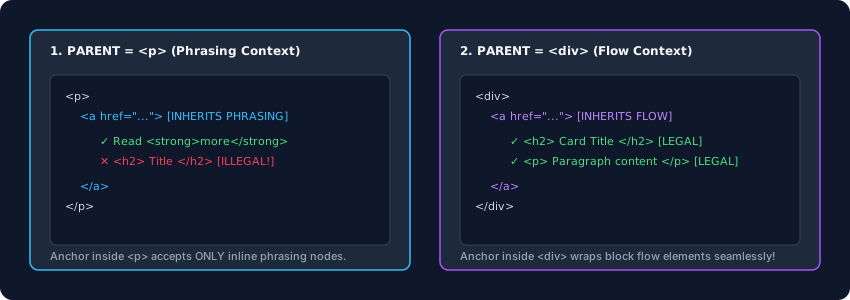
<a> inherits its allowed children from its parent context.The Transparent Content Model
Some elements, most notably <a>, are transparent: their allowed child content is not fixed but is inherited from the element they are directly inside.
If you place an <a> inside a <p>, it inherits a phrasing content model – only inline elements and text are allowed. If you place the same <a> inside a <div>, it inherits a flow content model – now it can legally wrap headings, paragraphs, and even lists. The parser checks the stack of open elements at runtime to determine what’s valid.
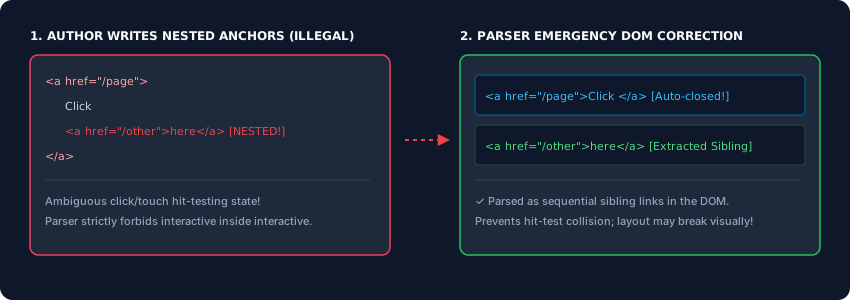
Hard Nesting Restrictions
Even if the content categories suggest something is possible, specific elements enforce absolute bans on nesting:
- No
<a>inside another<a>– the parser will close the first link early, making them siblings. - No
<button>inside another<button>– same behaviour. - No interactive content inside another interactive element (e.g., a
<button>containing a<select>).
Why? Hit‑testing. When the user clicks, the browser must determine which element receives focus and which URL to navigate to. Overlapping interactive nodes create ambiguous states. The parser’s emergency correction splits them apart, often destroying the intended visual layout.
<!-- This: -->
<a href="/page">Click <a href="/other">here</a></a>

<!-- Becomes this in the DOM: -->
<a href="/page">Click </a>
<a href="/other">here</a>
HTML5’s content categories replace the old block/inline model with a nuanced, multi‑dimensional system. Metadata configures the page, flow content fills the body, sectioning and heading elements build the outline, phrasing content handles inline text, embedded content imports media, and interactive elements drive user engagement. Transparent elements like <a> adapt to their parent’s rules, while hard restrictions prevent ambiguous interactive nesting. Understanding these categories lets you predict exactly how the parser will treat your markup – and avoid silent DOM surgery.