10.9 — From Tree to Screen: Layout, Painting & Compositing
All the parsing, tokenisation, and tree construction so far has produced invisible data structures. To turn them into a visible, interactive page, the browser must enter its most computationally intense phases: building a render tree, calculating layout, executing paint commands, and finally handing textured layers to the GPU for fast compositing.
Phase 1: Building the Render Tree
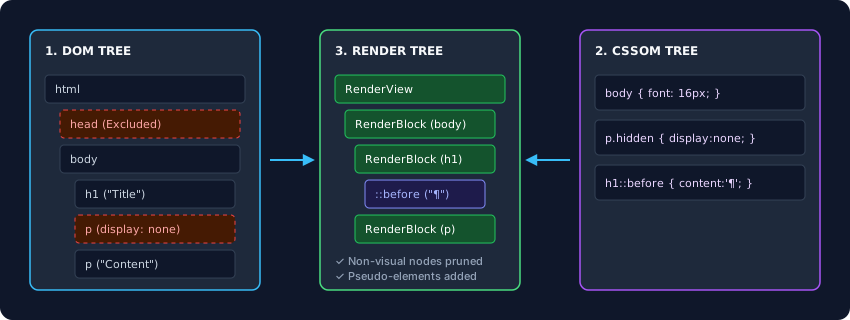
The DOM alone cannot produce pixels – it is a semantic tree. The CSS Object Model (CSSOM) holds the style rules. The browser merges them into a new hierarchy: the render tree (or layout object tree). This tree has several crucial differences from the DOM:
- Non‑visual elements are excluded. The entire
<head>section, along with<script>,<meta>, and<style>tags, generates no render objects. - Elements with
display: noneare omitted. They remain in the DOM for scripting but have zero presence in the render tree. - Pseudo‑elements create render objects.
::beforeand::afterhave no corresponding DOM nodes, yet the engine instantiates layout boxes for them in the render tree. - Anonymous boxes heal structure. If a
<div>contains raw text followed by a block, the engine wraps the text in an anonymous block box to maintain uniform block‑level layout.
Phase 2: Layout (Reflow)
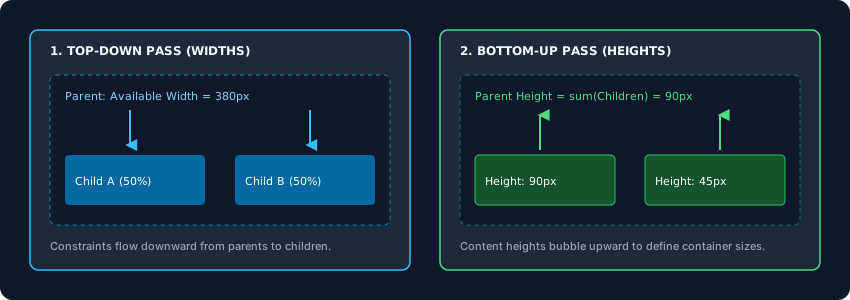
The render tree knows what should be visible, but not where or how large. The layout engine traverses the render tree and computes the exact position and size of every node, producing a geometric box model. The process is a two‑pass negotiation:
- Top‑down pass: The parent provides available width. Children calculate their own width based on that constraint (percentages, fixed values, or intrinsic sizes).
- Bottom‑up pass: Once widths are resolved, children’s heights are determined by their content, then bubble up to define the parent’s total height (unless the parent has a fixed height).
Layout is highly coupled: changing the width of an element near the root can invalidate the entire subtree, forcing a global reflow. When JavaScript repeatedly reads layout‑triggering properties (like offsetWidth) and immediately writes styles in a loop, it causes synchronous layout thrashing – one of the most severe performance killers.
Phase 3: Painting (Rasterisation)
With all coordinates locked, the paint phase translates geometric boxes into actual pixels – a process called rasterisation. The engine doesn’t paint everything onto one flat canvas; it works in display layers, driven by CSS stacking contexts.
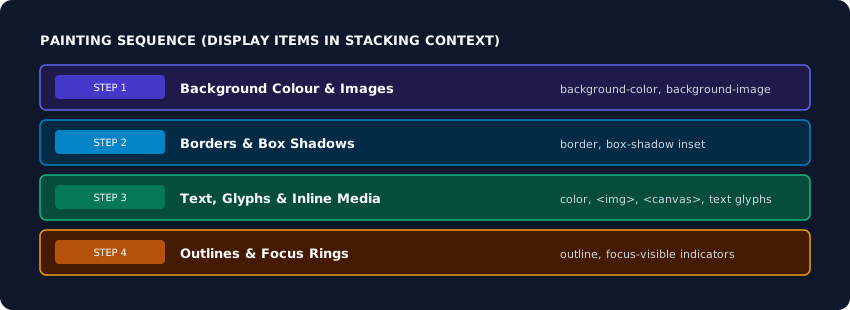
For each layer, the engine walks the layout tree and records a sequence of vector drawing commands – display items – in the correct paint order:
- Background colour and images
- Borders
- Text, glyphs, and embedded media
- Outlines and focus rings
In older browsers, these commands were executed directly on the main thread into a single bitmap. Scrolling required continuous re‑painting, causing jank.
Phase 4: GPU Compositing & Layer Promotion
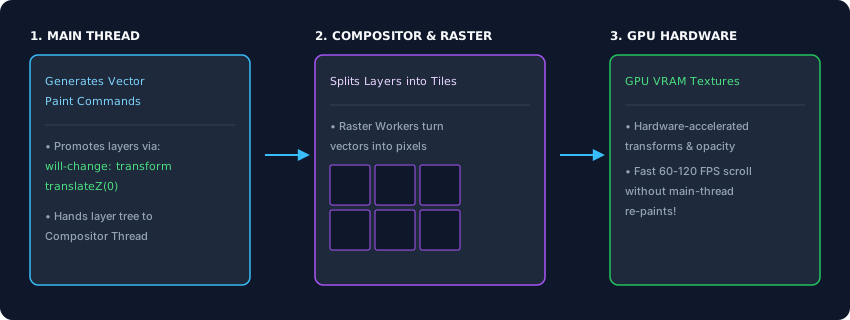
To eliminate unnecessary repainting, modern browsers split the page into multiple compositing layers. The main thread generates paint commands for each layer. The compositor thread (a separate, dedicated thread) takes over:
- It divides each layer into a grid of tiles.
- Raster threads (background workers) convert vector commands into pixel textures, often using the GPU for parallel processing.
- Textures are stored in GPU memory as hardware bitmaps.
Once the GPU holds the textures, the compositor thread can manipulate them without touching the main thread. Scrolling, pinch‑zooming, and certain CSS animations (opacity, transform) are performed entirely on the compositor, at 60–120 fps.
Layer promotion is the key to this performance. Elements that will move or animate independently should be promoted to their own compositing layer. This is triggered by:
transform: translateZ(0)or any 3D transformwill-change: transform,will-change: opacity- Active CSS animations or transitions on
transformoropacity
/* Promote a card to its own compositing layer */
.card {
    will-change: transform;
    transform: translateZ(0);
}
Use will-change sparingly – only for elements that will truly animate soon. Over‑promoting too many elements consumes GPU memory.
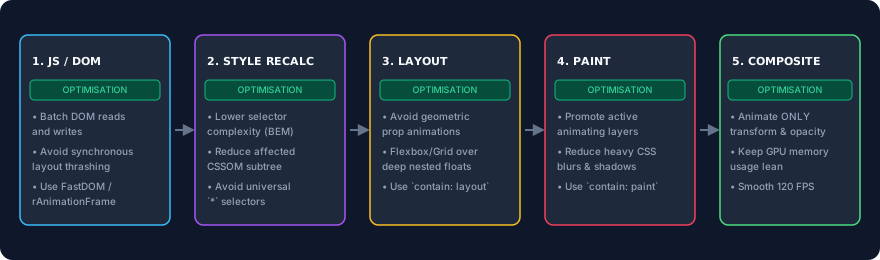
The browser’s visual output is the result of four tightly choreographed phases: merge the DOM and CSSOM into a render tree; calculate exact positions and sizes via layout (reflow); record drawing commands in the correct paint order; and hand textured layers to the GPU for fast, independent compositing. By understanding this pipeline, you can avoid layout thrashing, promote animating elements to their own layers, and keep the critical path smooth – delivering buttery‑smooth experiences on every device.