11.3 — Performance & Security Integration Recaps
The HTML document is the front line of your security posture and the control centre for resource loading. Three powerful, declarative tools live directly in your markup: Subresource Integrity for cryptographic asset verification, crossorigin for cross‑origin media management, and network hints for speculative performance acceleration. Together, they create a fast, bulletproof loading pipeline.
Subresource Integrity (SRI) – Cryptographic Asset Validation
When you load a JavaScript library or stylesheet from a third‑party CDN, you trust that the file hasn't been tampered with. But trust is not a security strategy. The integrity attribute turns trust into mathematical certainty.
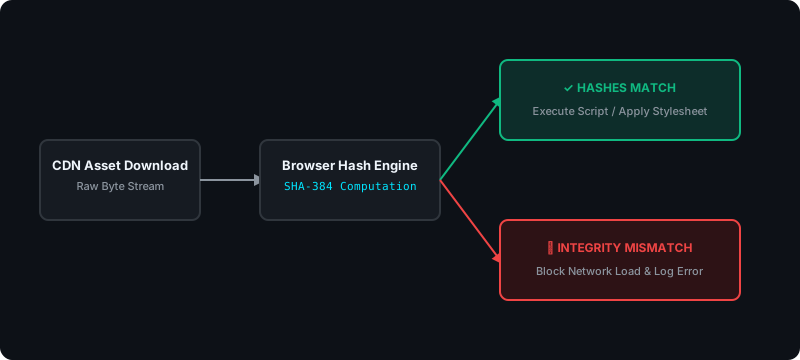
You supply a cryptographic hash of the expected file content. When the browser downloads the file, it intercepts the raw bytes, computes the real‑time hash, and compares it to your declared value. If a single character has been altered anywhere in the supply chain, the hashes won't match – and the browser blocks the file from executing or rendering.
<script src="https://cdn.com/lib.js"
        integrity="sha384-xyz..."
        crossorigin="anonymous">
</script>A compromised CDN could silently inject malicious code into the library. Your users' data would be exposed, and you would never know. SRI eliminates this entire class of supply‑chain attacks.
The crossorigin Attribute – CORS Boundary Management
When a page requests a resource from a different domain, port, or protocol, the browser enforces Cross‑Origin Resource Sharing (CORS) rules. By default, cross‑origin requests are sent without user credentials. The crossorigin attribute gives you explicit control over this boundary.
crossorigin="anonymous"– sends the request without cookies or authentication tokens, but requires the remote server to return valid CORS headers. If the server doesn't, the resource is blocked.crossorigin="use-credentials"– transmits session cookies and authentication tokens, while still enforcing strict CORS header validation on the response.
This attribute is mandatory when drawing cross‑origin images onto a <canvas>. Without it, the canvas becomes tainted – its pixel data is permanently locked, preventing JavaScript from reading or exporting it. By setting crossorigin="anonymous", you clear the security loop and keep the canvas fully accessible.

crossorigin, drawing a cross‑origin image locks the canvas permanently.Network Hints – Speculative Performance Acceleration
The main thread is constantly threatened by blocking resources. Network hints, declared on <link> elements, allow you to bypass standard parser scheduling and execute network operations before the primary layout engine discovers an asset.
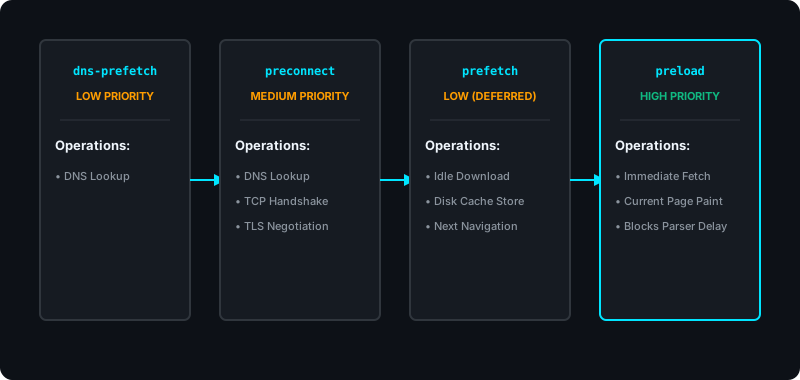
The four hint types form an escalating priority pipeline:
| Hint | What It Does | Priority |
|---|---|---|
dns-prefetch | Resolves the domain name to an IP address in the background. | Low |
preconnect | Performs DNS + TCP handshake + TLS negotiation ahead of time. Opens a live connection socket. | Medium |
prefetch | Downloads a future‑navigation resource during browser idle time and stores it in the disk cache. | Low (deferred) |
preload | Forces an immediate, top‑priority download of a critical resource needed for the current page's first paint. | High |
Enterprise Blueprint – A Fully Optimised, Secure Head
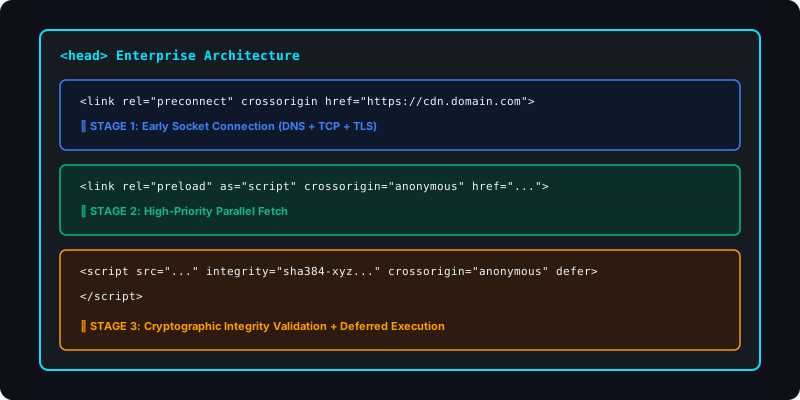
The following markup combines preconnect for the CDN, preload for a critical validator script, SRI for cryptographic integrity, and crossorigin for proper CORS management. Every link is a void element; every script pair is initialised before attributes.
<head>
  <meta charset="utf-8">
  <title>Secure Dashboard</title>

  <!-- Preconnect to the CDN: DNS + TCP + TLS -->
  <link rel="preconnect" crossorigin
        href="https://cdn.domain.com">

  <!-- Preload the critical validator script -->
  <link rel="preload" as="script" crossorigin="anonymous"
        href="https://cdn.domain.com/secure-validator.js">

  <!-- The actual script: SRI + CORS + deferred execution -->
  <script src="https://cdn.domain.com/secure-validator.js"
          crossorigin="anonymous"
          defer
          integrity="sha384-xyz...">
  </script>
</head>
With this configuration, the browser opens a live connection to the CDN before the script tag is even parsed, preloads the critical file at maximum priority, verifies its cryptographic integrity on arrival, and defers execution until the DOM is ready – all while maintaining strict cross‑origin security. The result is a page that loads faster, stays secure, and never executes compromised code.
Security and performance are not separate concerns – they are both governed by your HTML. Use integrity with strong cryptographic hashes to eliminate supply‑chain attacks. Use crossorigin to manage CORS boundaries and prevent canvas tainting. Deploy network hints – dns-prefetch, preconnect, prefetch, and preload – to accelerate every phase of the loading pipeline. When these three tools are combined, your document becomes a fortress that loads at lightning speed.