8.1 — Global Attributes: Complete Overview
Every HTML element, from <a> to <input> to <div>, accepts a common set of global attributes. These attributes don’t belong to any one tag – they provide universal hooks for identification, styling, internationalisation, interactivity, visibility, and custom data. Mastering them gives you precise, framework‑level control over any element in the DOM.
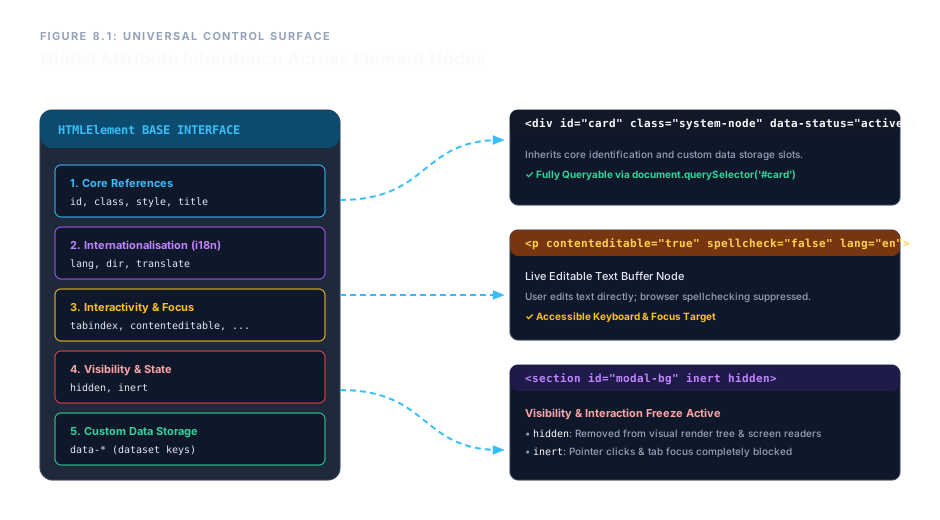
1. Core Reference Attributes
These three attributes are the backbone of element identification, grouping, and inline styling.
id – Unique Identifier
Assigns a case‑sensitive, document‑unique name to an element. Use it for anchor targets, form label associations, and JavaScript queries. An id value must appear only once per page.
<section id="chapter-one">
class – Classification Hook
A space‑separated list of tokens that map the element to CSS rules. Unlike id, a class can be reused on many elements, and a single element can carry multiple classes.
<div class="card highlight">
style – Inline Presentation (Use Sparingly)
Injects CSS rules directly into the element. While convenient for rapid prototypes, it mixes structure with presentation and should be avoided in production code in favour of external stylesheets.
<span style="color: red;">Warning</span>
title – Advisory Tooltip
Provides a text string that browsers typically display as a floating tooltip on hover. It is also read by screen readers when no other label is present.
<abbr title="HyperText Markup Language">HTML</abbr>
2. Internationalisation & Direction
These attributes guide font rendering, screen readers, and translation tools.
lang – Language Declaration
Sets the human language of the element’s content using IETF language tags. It affects hyphenation, spelling, and voice pronunciation.
<html lang="en">

                <p lang="es">Hola</p>
dir – Text Direction
Controls the writing direction. Values: ltr (left‑to‑right), rtl (right‑to‑left), auto (browser detects direction from first strong character).
<p dir="rtl">مرحبا</p>
translate – Translation Lock
Prevents automated translation tools from altering technical terms, code snippets, or brand names. Set to no to protect the content.
<code translate="no">getElementById</code>
3. Interactivity & Focus Control
tabindex – Keyboard Focus Order
Controls whether an element can receive focus via the Tab key. 0 adds it to the natural tab order; -1 removes it from sequential navigation but allows programmatic focus.
<div tabindex="0">Focusable container</div>
autofocus – Initial Focus Target
A boolean attribute. The element automatically receives focus when the page loads. Only one element per page should use it.
<input type="text" autofocus>
contenteditable – Live Text Editor
Makes the element’s text directly editable by the user. Set to true to enable, false to disable within an editable context.
<div contenteditable="true">You can edit this text.</div>
spellcheck – Grammar & Spell Checking
Toggles browser spell‑checking on text fields and contenteditable regions. false suppresses red underlines.
<textarea spellcheck="false"></textarea>
draggable – Drag‑and‑Drop Initiation
A boolean attribute (true or false) that makes an element draggable. Often used with JavaScript drag‑and‑drop APIs.
<img src="icon.png" draggable="true" alt="Draggable icon">
4. Visibility & Interaction Freezing
hidden – Complete Removal from View & Accessibility
The element is not rendered, and it is removed from the accessibility tree. Unlike CSS display: none, this is a semantic declaration that the content is not currently relevant.
<div hidden>This is not visible.</div>
inert – Freeze User Interaction
When present, the element and its entire subtree become non‑interactive: clicks do nothing, focus cannot enter, and screen readers ignore the content. Ideal for background content behind a modal.
<main inert>...</main>
Below is an inert container (non‑interactive):
Nothing inside the inert box responds to clicks or keyboard.
5. Custom Data Attributes (data-*)
Any attribute beginning with data- is a valid, custom data storage slot. It never affects rendering, but can be read by JavaScript or CSS. The name must be lowercase and at least one character after the prefix.
<div data-user-id="483" data-status="active">
This provides a standards‑compliant way to embed metadata directly in HTML without abusing class or other visible attributes.
Enterprise Blueprint – Fully Configured Module Card
The following markup combines many global attributes into a single production‑ready component. Notice how id, class, lang, dir, translate, contenteditable, spellcheck, and custom data-* attributes all coexist harmoniously.
<div id="node-processor-8" class="system-module-card"
     lang="en" dir="ltr"
     data-node-status="active" data-refresh-interval="45">
  <h3 translate="no">SYSTEM_CORE_MATRIX</h3>
  <p contenteditable="true" spellcheck="false">Update structural logs here...</p>
</div>
SYSTEM_CORE_MATRIX
Update structural logs here...
Try editing the paragraph – it's fully editable, with spell‑check disabled. The heading is protected from translation.
Global attributes form the universal control surface of HTML. Use id and class for selection and styling, lang and dir for internationalisation, tabindex and autofocus for keyboard navigation, contenteditable and spellcheck for inline editing, hidden and inert for visibility management, and data-* for custom metadata. They are the glue that makes every element a first‑class citizen in a professional, maintainable document.