8.2 — Microdata & Structured Data
Search engines and automated data scrapers cannot understand the meaning of plain text. Microdata solves this by letting you annotate your existing HTML with machine‑readable schema tokens from Schema.org. With just three attributes – itemscope, itemtype, and itemprop – you can turn any page into a rich, structured data source without altering its visual appearance.
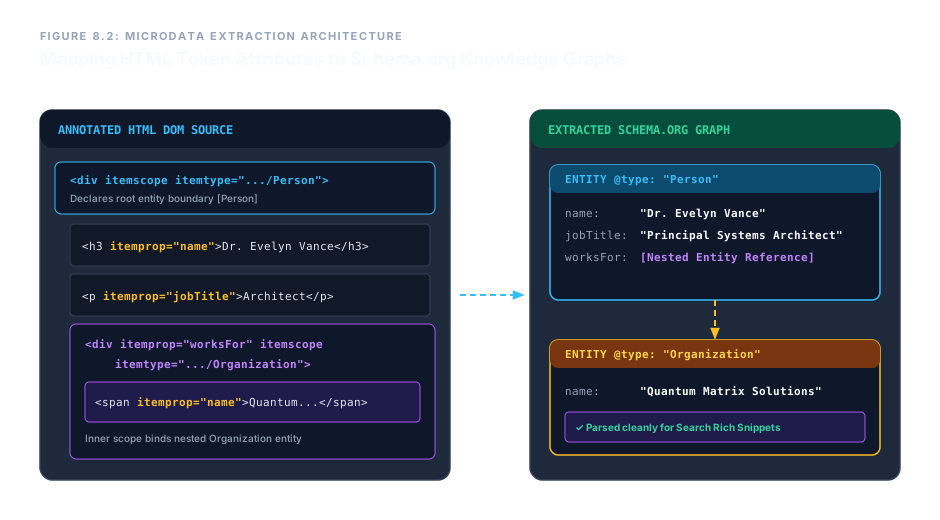
The Three Pillars of Microdata
itemscope – The Scope Boundary
Add the boolean itemscope attribute to any element to create a new metadata container. Everything inside this element can now carry property definitions that belong to a single, distinct data object.
<div itemscope> ... </div>
itemtype – The Schema Vocabulary
Use itemtype (only on an element that already has itemscope) to specify the exact Schema.org type that describes this object. The value must be a valid URL pointing to a schema definition, like https://schema.org/Person.
<div itemscope itemtype="https://schema.org/Person"> ... </div>
itemprop – The Property Key
itemprop attaches a schema property name to a text node or an element. When placed inside an itemscope block, its value is associated with the parent object. For example, itemprop="name" tells the parser that the enclosed text is the name of the person or organization defined by the parent scope.
<span itemprop="name">Jane Doe</span>
Nested Objects – Linking Entities Together
Real‑world data often involves relationships. With microdata, you can nest one itemscope inside another, using itemprop on the inner container to bind it as a property of the outer object. This creates a clean, hierarchical data model directly in your HTML.
For example, a Person can have a worksFor property that is itself an Organization, complete with its own name. The browser and search engines interpret this nesting as a parent‑child relationship.
Enterprise Blueprint – Person with Nested Organization
The following markup defines a complete Person object with a nested Organization. Every piece of visible text is also machine‑readable, making the page eligible for rich search results (like knowledge panels). The visual appearance is unchanged – only the metadata is enriched.
<div itemscope itemtype="https://schema.org/Person" class="profile-card">
  <h3 itemprop="name">Dr. Evelyn Vance</h3>
  <p itemprop="jobTitle">Principal Systems Architect</p>
  <div itemprop="worksFor" itemscope itemtype="https://schema.org/Organization">
    <span itemprop="name">Quantum Matrix Solutions</span>
  </div>
</div>
Dr. Evelyn Vance
Principal Systems Architect
This block looks like ordinary text to a human, but a search engine can now extract the person’s name, job title, and employer as structured data.
To verify the annotations, open the page in a browser and use the Elements inspector – you’ll see the itemscope, itemtype, and itemprop attributes clearly. Search engines like Google use this exact format to generate rich snippets in search results.
Microdata brings the semantic web to your HTML. Create a scope with itemscope, identify the schema with itemtype, and tag properties with itemprop. Nest scopes to express complex relationships. With these three attributes, you transform any document from a wall of text into a structured, search‑friendly knowledge graph – all without affecting the page’s visual design.