8.3 — HTML Entities & Character References
The browser’s parser is always watching. The moment it sees a raw < or &, it switches from reading text to interpreting markup. Character references are the escape hatches that let you display those symbols safely, along with thousands of other characters from the Unicode universe, without breaking your document.
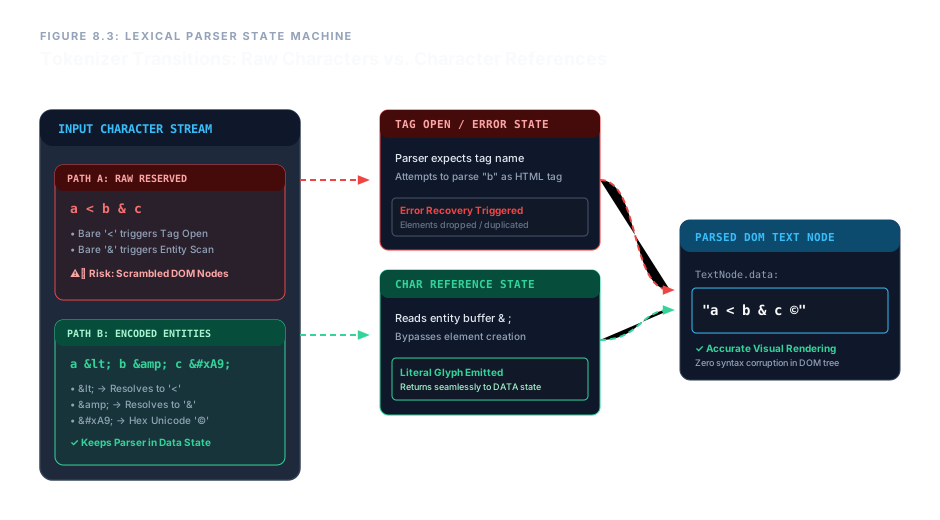
Why Raw Reserved Characters Break Your Page
The HTML parser scans your file character by character. When it hits a <, it immediately enters a “tag open” state, expecting a valid element name. If you meant to write “a < b” as plain text, the parser will try to read b as a tag – and fail. The browser then invokes error recovery, which can silently delete, duplicate, or scramble content.
Similarly, the & character triggers a “character reference” state. If you write “&” without properly escaping it, the parser will read it as the start of an entity and may consume text that follows, causing garbled output.
Character references solve this by telling the parser: “Do not switch state; this symbol should appear as literal text.”
Named Character Entities
Named entities use human‑readable abbreviations. Every entity must start with & and end with ;. The most important ones correspond to the five reserved characters, plus a few everyday symbols.
| Character | Named Entity | Description |
|---|---|---|
< | < | Less‑than sign |
> | > | Greater‑than sign |
& | & | Ampersand |
" | " | Double quotation mark |
' | ' | Apostrophe / single quote |
| (non‑breaking space) | | Space that prevents line wrapping |
© | © | Copyright symbol |
— | — | Em dash |
In your HTML source you write the named entity; the browser renders the actual character. For example, typing < in the source produces < on the page.
Hexadecimal Numeric References
When a character doesn’t have a convenient name – or you prefer to use its precise Unicode codepoint – you can use a hexadecimal numeric reference. The syntax is:
&#xHEX;
The reference begins with &#x, followed by the hexadecimal codepoint, and ends with ;. The letters A–F are case‑insensitive.
< → <
& → &
© → ©
— → —
This method gives you access to every character in the Unicode standard, from mathematical operators to emoji. No named entity is required.
Enterprise Blueprint – Safe Character Embedding in a Diagnostics Card
The following markup demonstrates a section that uses named entities and hexadecimal references to safely display reserved characters and a copyright symbol. The page renders correctly, and the parser never misinterprets the content.
<section class="code-explainer-card">
<h4>System Syntax Analysis & Compilation Log</h4>
<p>
To clear a structural tag block error within the ingestion script,
the raw operator code marker must verify that value alpha is <
value beta, while ensuring that the logical sequence validator token
& symbol properties match target parameters.
All corporate layout data records remain protected under global
copyright registry © 2026 Core Infrastructure Systems.
</p>
</section>System Syntax Analysis & Compilation Log
To clear a structural tag block error within the ingestion script, the raw operator code marker must verify that value alpha is < value beta, while ensuring that the logical sequence validator token & symbol properties match target parameters. All corporate layout data records remain protected under global copyright registry © 2026 Core Infrastructure Systems.
The text appears as intended, with the less‑than sign, ampersand, and copyright symbol rendered correctly – no parsing errors.
In the source code, every & that is meant to be displayed is written as &, every < as <, and the copyright symbol as its hex reference ©. This discipline keeps the document valid and predictable.
Use named entities (<, &, ", ', ) for the five reserved characters and common symbols. Reach for hexadecimal numeric references (&#xHEX;) for any other Unicode character. Always encode raw < and & in your content – never let the parser see them bare. With this practice, you guarantee error‑free rendering across all browsers and contexts.