8.4 — Deprecated Elements & Attributes: What Not to Use
The web has evolved. Many tags and attributes that once styled pages are now obsolete. Using them breaks the separation of structure and presentation, cripples accessibility, and hurts performance. This section lists the forbidden relics – and shows you the clean, modern alternatives.
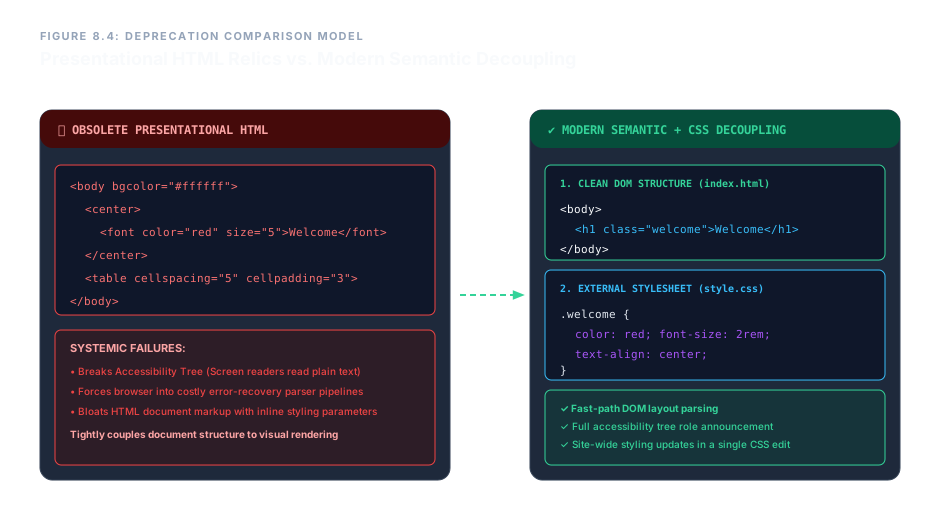
The Two Catastrophic Failures They Trigger
Deprecated tags carry zero semantic meaning. If you use <font color="red"> to mark an urgent warning, a screen reader sees only plain text – no urgency, no role, no structure. Assistive technology cannot perceive colours or blinking effects; it relies entirely on semantic elements like <strong> or ARIA roles.
Modern browsers use fast‑track rendering pipelines for clean, semantic HTML. When they encounter legacy presentational code, they must invoke complex error‑recovery algorithms that slow down rendering. Additionally, repeating visual attributes on every element bloats the page, wastes bandwidth, and makes maintenance a nightmare.
Deprecated Elements – Complete Blacklist
The following elements have been removed from the HTML specification and must never be used in modern projects. Each one is listed with its modern replacement.
| Deprecated Element | Purpose (Historical) | Modern Replacement |
|---|---|---|
<font> | Set text colour, face, and size inline | CSS properties: color, font-family, font-size |
<center> | Horizontally centre block elements | CSS: text-align: center or margin: 0 auto |
<big> | Make text larger | CSS font-size |
<strike> / <s>* | Draw a line through text | <del> for deleted content, CSS text-decoration for visual |
<marquee> | Scrolling text banner | CSS animations or JavaScript (used sparingly) |
<blink> | Flashing text | Never use – violates accessibility guidelines |
*Note: <s> is still valid in HTML5 as a visual strikethrough for no-longer-accurate text (like old prices), but <del> carries semantic deletion meaning.
Deprecated Attributes – Purge Them All
Even on valid elements, these attributes mix presentation into structure and must be replaced by CSS.
| Deprecated Attribute | Used On | Modern CSS Replacement |
|---|---|---|
bgcolor | <body>, <table>, <tr>, <td> | background-color |
align | <p>, <h1>–<h6>, <div>, <table>, etc. | text-align, margin, flexbox/grid |
cellspacing | <table> | border-spacing |
cellpadding | <table> | padding on <td> / <th> |
border (on non‑table elements) | <img>, <object>, etc. | border CSS property |
The HTML specification uniquely allows border="1" on a <table> element as a semantic marker to indicate that the table contains true tabular data (not a layout grid). However, this is a minimal fallback – real styling should still be done with CSS.
Before and After: Cleaning Up Legacy Code
❌ Deprecated Approach
<body bgcolor="#ffffff">
  <center>
    <font color="red" size="5">Welcome</font>
  </center>
  <table border="2" cellspacing="5" cellpadding="3">
    <tr><td bgcolor="#ffff00">Data</td></tr>
  </table>
</body>
✔ Modern Semantic + CSS Approach
<body>
  <h1 class="welcome">Welcome</h1>
  <table class="data-table">
    <tr><td>Data</td></tr>
  </table>
</body>

/* In an external stylesheet */
body { background: #fff; }
.welcome { color: red; font-size: 2rem; text-align: center; }
.data-table { border-collapse: collapse; }
.data-table td { border: 2px solid #333; padding: 0.5rem; background: #ff0; }
The modern version is cleaner, accessible, and infinitely easier to maintain. Changing the welcome colour across the entire site requires a single CSS edit, not hunting through every page’s <font> tags.
Deprecated elements and attributes are not merely “old” – they are actively harmful. They shatter accessibility, degrade performance, and violate the separation of concerns. Always replace <font>, <center>, <big>, <marquee>, and their kind with semantic HTML and CSS. Remove bgcolor, align, cellspacing, and similar attributes in favour of clean stylesheets. By purging these relics, you build pages that are fast, inclusive, and ready for the future.