1.2 — Writing Your First Web Page: The Anatomy of Tags
Now that we have explored the history of HTML, it is time to look at a real, raw HTML file. If you open a plain text editor and type just a few lines of code, you have created a functional web document. But to understand how a computer reads that file, we must first dissect the syntax of our tags and see how they form structure.
The Building Blocks: Opening & Closing Tags
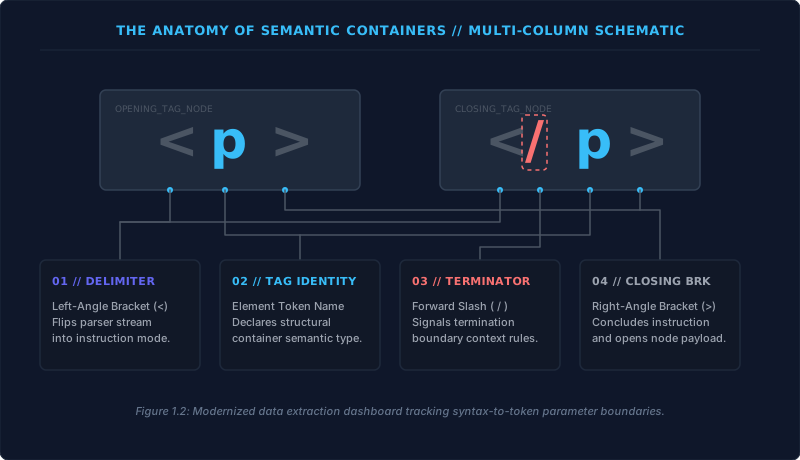
A standard HTML tag is built from three essential characters, wrapping an element name to give it purpose.
- The Left‑Angle Bracket (
<) – This is the less‑than sign on your keyboard. It signals the browser parser to stop reading raw text and switch immediately into instruction mode. - The Element Token – The keyword that identifies the type of element. For example,
pmeans paragraph,h1means heading level one, andstrongmeans strong importance. The characters inside the brackets define the tag's exact role. - The Right‑Angle Bracket (
>) – This is the greater‑than sign. It closes the tag definition and allows the content to begin.
Most HTML tags work like an on/off switch for a structural container. The opening tag activates the rule, and the closing tag turns it off. The closing tag is built exactly like the opening tag, but it includes a forward slash (/) immediately after the less‑than symbol – for example, </p>. This slash tells the parser, “the element ends here.”
Attributes: Adding Extra Configuration
Sometimes a tag needs extra information to do its job properly. This is where attributes come in. Attributes are always declared inside the opening tag, separated from the tag name by a single space. An attribute consists of two parts: an attribute name and an attribute value.
Take the paragraph tag as an example. We can write <p lang="en-us">. Here, lang is the attribute name, specifying that we want to declare a human language property. The text inside the quotation marks – "en-us" – is the attribute value, telling the computer that the paragraph content is written in United States English.
Attributes are not limited to language. They can set hyperlink destinations (href), image sources (src), unique identifiers (id), and many other properties. The value must always be wrapped in straight quotation marks, and the attribute name must be followed by an equals sign with no spaces.
<tagname attributename="value">
No spaces around the equals sign. Always use double quotes around the value.
Nesting: The Stack‑Order Rule
When you start grouping multiple elements on a page, they must follow a strict structural hierarchy called nesting. Think of nesting as a clean arrangement where elements sit either sequentially or entirely inside one another, building a clear box‑within‑a‑box layout.
When one element wraps around another, the outer container is the parent, and the inner element is the child. For example, an <html> container wraps around a <body> container, which then wraps around your visible headings and paragraphs.
The absolute law of nesting is the Stack Order Rule: tags must close in the exact reverse order that they were opened. An inner child element must terminate completely before its outer parent element is allowed to terminate. If you open a paragraph tag and then open a strong tag for emphasis, you must close the strong tag first, and only then close the paragraph tag.
Overlapping is illegal. Writing <p>Hello <strong>World</p></strong> breaks the syntactic structure. The correct form is <p>Hello <strong>World</strong></p> – the inner element is completely contained.
A Complete Document Example
Let us look at a practical code layout that uses these structures cleanly. The following snippet is a minimal, yet fully valid, HTML document.
<!DOCTYPE html>
<html lang="en">
<head>
    <title>My First Page</title>
</head>
<body>
    <h1>This is the Main Heading</h1>
    <p>This text might be an introduction to the rest of the page.</p>

    <h2>This is a Sub-Heading</h2>
    <p>Many pages use sub‑headings to break up the content.</p>
</body>
</html>
In this document, the <h1> and <h2> elements establish a clear informational hierarchy. <h1> denotes the absolute primary title of the page, while <h2> creates a secondary sub‑heading tier. Together they form an outline that helps both readers and search engines understand the page’s structure.
If you completely strip away the outer <html> and <body> wrappers, leaving only the raw headings and paragraphs, a browser will still render the page. This works because browser engines are built to be fault‑tolerant. When the parser does not find those major structural wrappers, it uses implicit node rules to automatically generate the missing <html> and <body> structures in memory.
You can witness this live: right‑click any page and choose View Page Source to see the raw file as you wrote it. Then, select Inspect Element to see the live Document Object Model (DOM) – a tree the browser has automatically wrapped inside perfectly structured <html> and <body> nodes. Never rely on this safety net. Omitting structural containers will cause severe errors the moment you add complex metadata, styling, or scripting. Master the syntax, respect the hierarchy, and always explicitly wrap your code.
Every HTML page is built from three core concepts: tags that define elements, attributes that configure them, and a strict nesting order that creates a clean document tree. Once you internalise these rules, you have the syntactic foundation for everything that follows.