10.5 — User‑Agent Stylesheets & Element Defaults
Even if you write no CSS, your page doesn’t render as chaos. That’s because every browser ships with a built‑in stylesheet – the user‑agent stylesheet – that gives every element a baseline appearance. Headings are bold, paragraphs have margins, and links are blue. This section reveals exactly how this hidden layer works and how it defines the two fundamental layout modes: block and inline.
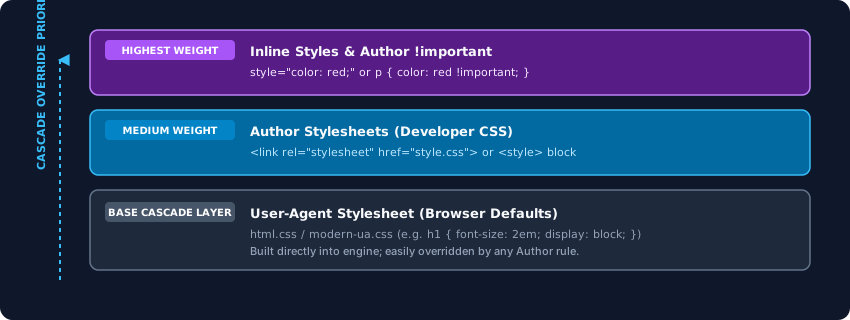
The Hidden Rules: What the User‑Agent Stylesheet Does
The user‑agent stylesheet is a hardcoded CSS file compiled directly into the browser engine. In Chromium’s Blink engine it’s called html.css; in WebKit it’s modern-ua.css. It contains rules like:
h1 { font-size: 2em; font-weight: bold; margin: 0.67em 0; }
p  { margin: 1em 0; }
ul, ol { padding-left: 40px; }
a:link { color: blue; text-decoration: underline; }
These rules are applied during the style recalculation phase, before any author CSS is considered. Because they sit at the lowest level of the cascade, any rule you write in your own stylesheet will override them – unless the UA rule uses !important, which gives it a higher weight.
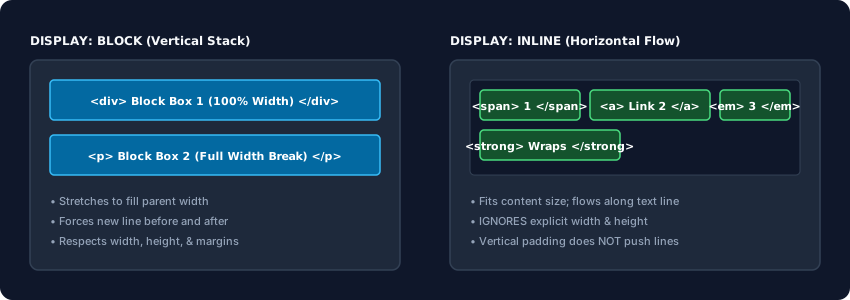
Block‑Level Elements – The Vertical Stack
The user‑agent stylesheet assigns display: block to structural elements like <div>, <p>, <h1>–<h6>, <section>, and <li>. A block box:
- Stretches to fill the full width of its parent container by default.
- Forces a line break before and after itself.
- Stacks vertically; subsequent elements appear below it.
- Has default margins that collapse – adjacent vertical margins merge into a single gap.
<div>I am a block</div>
<div>So am I</div>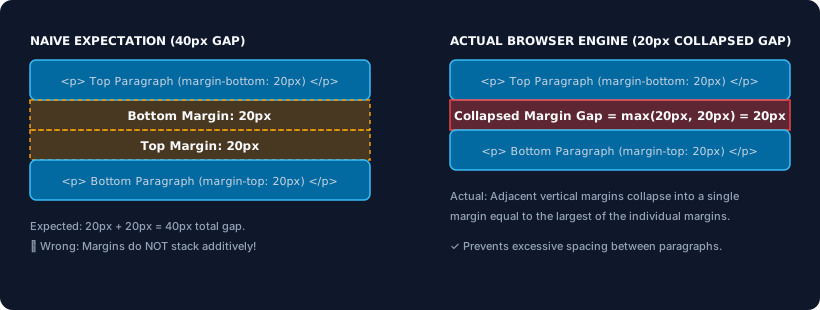
Inline Elements – The Horizontal Flow
Tags like <span>, <a>, <strong>, <em>, and <br> receive display: inline from the user‑agent stylesheet. Inline boxes:
- Sit side‑by‑side on the same line, wrapping only at the container edge.
- Do not generate line breaks before or after themselves.
- Ignore explicit
widthandheight– the browser silently discards them. - Vertical padding and borders are painted but do not push other lines away; they can overlap.
<span style="padding:10px; border:1px solid">Inline A</span>
<span style="padding:10px; border:1px solid">Inline B</span>The user‑agent stylesheet is the lowest layer of the cascade, providing every HTML element with default margins, font sizes, and display modes. Block elements stack vertically and fill width; inline elements flow horizontally and ignore width/height. Understanding these built‑in rules is essential for debugging layout issues and mastering CSS.