6.4 — Embedding External Content
Embedding outside resources – whole web pages, PDF documents, or third‑party widgets – requires security‑first thinking. The <iframe> element creates a sandboxed, isolated browsing context, while <object> provides a graceful fallback for document formats the browser might not support. Done right, external content integrates seamlessly without exposing users to cross‑site scripting (XSS) or clickjacking attacks.
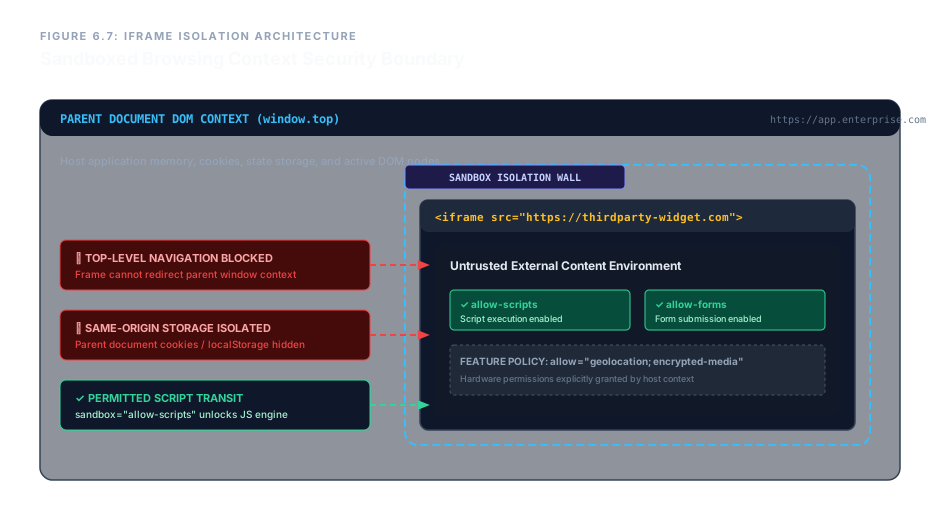
<iframe> sandbox creates a security boundary between the parent page and the embedded content.The <iframe> Element – A Secure Nested Context
An <iframe> embeds an entire HTML document inside yours. It is a container tag pair. The most important attribute is sandbox, which applies a restrictive security policy to the embedded content.
Core Attributes
src– the URL of the embedded page.title– a short description for accessibility (screen readers announce the frame’s purpose).sandbox– when present (even empty), it enables the most restrictive sandbox: no scripts, no forms, no plugins, no navigation of the top‑level context. To selectively re‑enable features, provide space‑separated tokens:allow-scripts– run JavaScript inside the frame.allow-forms– allow form submissions inside the frame.allow-same-origin– treat the frame’s origin as the same as the parent (use with caution).allow-popups,allow-downloads, etc.
allow– grants specific feature permissions (e.g.,geolocation,encrypted-media,camera).loading="lazy"– defers loading the iframe until it is near the viewport.
<iframe src="https://example.com/widget"
        title="Example Widget"
        sandbox="allow-scripts allow-forms"
        allow="geolocation"
        loading="lazy"
        width="600" height="400">
</iframe>
An <iframe> with a secure sandbox.
The <object> Element – Fallback‑Ready Embedding
<object> is a versatile container that can embed images, PDFs, or even other HTML documents. Unlike <iframe>, it offers a built‑in fallback mechanism: any content placed between the opening and closing tags is displayed only if the browser cannot render the primary resource.
Key Attributes
data– the URL of the resource (equivalent tosrc).type– the MIME type of the resource, e.g.,application/pdf.width/height– dimensions of the embedded content.
<object data="manual.pdf" type="application/pdf" width="100%" height="600">
  <p>Your browser cannot display PDFs inline.
     <a href="manual.pdf">Download the manual</a>.</p>
</object>The <object> shows fallback text when the PDF plugin is unavailable.
Enterprise Blueprint – Secure Dashboard with Embedded Analytics and PDF Manual
The following production‑grade snippet embeds a secure telemetry dashboard via an <iframe> and provides a PDF engineering manual via <object> with a full fallback. Every attribute is chosen to balance functionality and security.
<div class="external-resource-envelope">

  <h3>Secure Corporate Telemetry Processing Node</h3>

  <iframe src="https://analytics-core.enterprise-matrix.com/embed/node-0"
          title="Realtime System Matrix Core Analytics Dashboard Frame"
          sandbox="allow-scripts allow-forms allow-same-origin"
          allow="geolocation; encrypted-media"
          loading="lazy"
          width="100%" height="650">
  </iframe>

  <hr>

  <h3>System Engineering Architecture Documentation</h3>

  <object data="docs/manual-v12.pdf"
          type="application/pdf"
          width="100%" height="800">
    <div class="plugin-failure-fallback-panel">
      <h4>Native Document Plugin Evaluation Alert</h4>
      <p>The host browser architecture lacks a native document plug‑in tool to render the documentation manual layout inline.</p>
      <p>Please access the document data records directly by executing a local download:
         <a href="docs/manual-v12.pdf"
            download="enterprise-manual-v12.pdf">Download Raw PDF Manual Archive (3.4 MB)</a>.
      </p>
    </div>
  </object>

</div>
The <iframe> is sandboxed but retains scripts and forms because the analytics dashboard needs them. The <object> gracefully degrades to a download link if the PDF plugin is missing. Together they form a secure, robust external content layer.
Use <iframe> to embed external pages and always apply the sandbox attribute – start with an empty value (maximum restriction) and add tokens only as needed. Give every <iframe> a title for accessibility. When embedding documents, <object> provides a natural fallback path: simply place alternative content inside it. Defer off‑screen iframes with loading="lazy" and use allow to grant specific browser features. With these practices, external content becomes a safe, seamless part of your application.